Sunday, August 2, 2009

BleachBit 0.6.0 released

Version 0.6.0 is a major release of BleachBit, the free and open source file and privacy cleaner for Linux and Windows. This release includes new and improved cleaners, a safety feature, enhanced CleanerML for writing new cleaners, bug fixes, small performance improvements, and improved translations.

Changes

The following changes are included since 0.5.4:

  • Stay alert: the Delete and Preview buttons are swapped, so the order is now more logical.
  • Clean the typed history in Opera.
  • Clean Opera 10 beta.
  • Refuse to clean these applications while they are running: APT, Epiphany, Evolution, Firefox, Google Chrome, and Skype.
  • When previewing or deleting, the list of files continuously scroll to the ends providing a real-time status.
  • In case of permissions error when shredding a file, fall back to simple delete.
  • Clean Pidgin cached buddies' avatars thanks to Danilo Piazzalunga.
  • Add SQLite vacuuming action to CleanerML.
  • Change to a plugin-based action-handling system. This change is not visible to end users, but it makes it easier to add new types of cleaners in CleanerML. Already this system is used for SQLite vacuuming and for APT.
  • Make small performance improvements.
  • Fix some potential crashes on startup.
  • Specific to Linux
    • Clean APT as if running apt-get clean thanks to MixCool.
    • Clean APT by running apt-get autoremove.
    • Clean Downloader for X (d4x) thanks to MixCool.
    • Clean EasyTag thanks to juancarlospaco and MixCool.
    • Clean Evolution thanks to MixCool.
    • Clean Liferea.
  • Specific to Windows
    • BleachBit for Microsoft Windows is no longer considered a preview release.
    • Clean more MRUs for Windows Media Player.
    • Clean more Adobe Reader MRUs.
    • Empty the Recycle Bin.
    • Delete locked files on Windows by marking them for deletion when Windows restarts. This particularly helps deleting Internet Explorer's index.dat files. So far deleting locked files works better on Windows XP than on Vista.
    • Automatically detect the language thanks to Adrián García. The setting can be changed in Control Panel → Regional and Language Options → Standards and formats.
    • Fix localization of GTK+ itself. This means a more thorough translation.

Translations

  • Add Galician thanks to Jon Amil.
  • Add Indonesian thanks to Ramdhani Fathurrohman.
  • Add Romanian thanks to Catalin Fluturel.
  • Add Swedish thanks to Jens Stääf.
  • Update Arabic thanks to Dilmi Fethi and MaXeR.
  • Update Brazilian Portuguese thanks to Andrius Gabriel da Luz, Felipe Tanus, and Michele Medeiros.
  • Update Bulgarian thanks to Svetoslav Stefanov.
  • Update Czech thanks to Roman Horník.
  • Update Dutch thanks to Rob.
  • Update French thanks to Matthieu Martin, Sultan Rahi, Pierre Slamich, and j0nnnnn0.
  • Update German thanks to MixCool.
  • Update Hebrew thanks to Yaron.
  • Update Hindi thanks to Asutosh Dash.
  • Update Italian thanks to briga, Luca Falavigna, Marco Donato Torsello, and Santiago.
  • Update Polish thanks to Dariusz Jakoniuk.
  • Update Portuguese thanks to Jon Amil.
  • Update Russian thanks to Ilia Lilov aka lilovip.
  • Update Serbian thanks to Roman Horník.
  • Update Slovak thanks to Roman Horník.
  • Update Polish thanks to Darek Jakoniuk.
  • Update Spanish thanks to juancarlospaco.
  • Update Turkish thanks to Ufuk Yıldırım.

Known issues

  • On GNOME 2.26 (Ubuntu 9.04), deleting the recent documents list files is not enough to clear the list because GNOME retains it also in memory. As a workaround, you may run the following command to restart the panel after BleachBit deletes the file:
    killall gnome-panel

Screenshots

BleachBit 0.6.0 on Ubuntu 9.04 showing the Firefox preview
BleachBit on Ubuntu 9.04 showing the Firefox preview
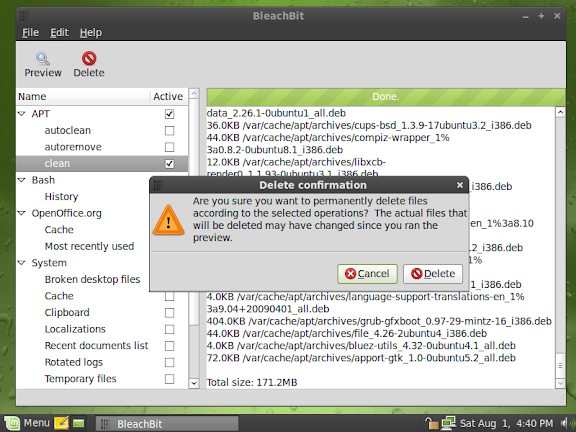
BleachBit 0.6.0 on Linux Mint 7
BleachBit on Linux Mint 7 showing a preview and the delete confirmation dialog
BleachBit 0.6.0 in Indonesian on Fedora 11 (Leonidas)
BleachBit in Indonesian on Fedora 11 (Leonidas)
BleachBit 0.6.0 in Romanian (limba română) on Ubuntu 9.04
BleachBit in Romanian on Ubuntu 9.04 showing the Firefox preview
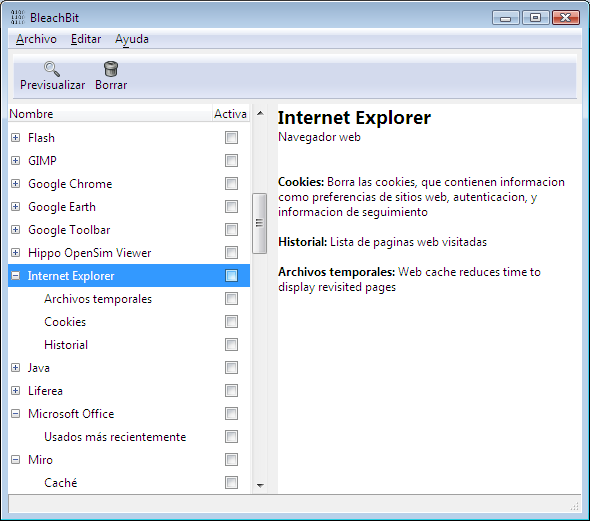
BleachBit 0.6.0 on Windows Vista in Spanish (Español) showing the Internet Explorer description
BleachBit on Windows Vista in Spanish showing the Internet Explorer description
BleachBit 0.6.0 on Windows Vista in Galician (Galego) showing the Firefox preview
BleachBit on Windows Vista in Galician showing the Firefox preview

See more screenshots on the new screenshots web page.

Download

Download BleachBit now. Installation packages are ready for 20 platforms including CentOS, Debian, Fedora, Mandriva, openSUSE, Red Hat, Ubuntu, and Windows.

Thursday, July 23, 2009

Test BleachBit 0.6.0 beta

Want to test BleachBit 0.6.0 beta? It contains numerous new features and some fixes. In particular, please test:

  • BleachBit should refuse to clean these applications while they are running: APT, Epiphany, Evolution, Firefox, Google Chrome, and Skype.
  • When previewing or deleting, the list of files should continuously scroll to the end.
  • On Linux, please test the new APT cleaner (only for Debian, Ubuntu, Linux Mint, and other apt-based systems).
  • On Linux, please test SQLite database vacuuming in Liferea.
  • On Windows, BleachBit (the application, not the installer) should automatically detect your native language and show text in the correct language (must be one of the 27 translated languages). To change the language, go to the Windows Control Panel, click on Regionalization, choose your language under Standards and Formats, and restart BleachBit.
  • On Windows XP, BleachBit should clean all of Internet Explorer without errors (which would be indicated in a red color).
  • On Windows Vista, you may see 'access denied' cleaning Internet Explorer unless you right click on the BleachBit shortcut and choose 'Run as Administrator.'
  • On Windows, BleachBit should empty the Recycle Bin of all fixed drives (i.e., not network drives, not remove-able drives, and not read-only drives).
  • There are new languages: Galician, Swedish, Romanian.

Please be aware: the positions of the Preview and Delete buttons have been swapped!

Because of the significant time it takes to prepare all the installation packages, only the following files are offered for this beta:

  • Microsoft Windows: BleachBit-0.6.0beta-Win32-install-full-gtk.exe
  • Ubuntu Hardy Heron 8.04 (Python 2.5): bleachbit_0.6.0beta-1_all_ubuntu804.deb
  • Ubuntu Jaunty Jackalope 9.04 (Python 2.6): bleachbit_0.6.0beta-1_all_ubuntu904.deb
  • Source code: bleachbit-0.6.0beta.tar.gz

[Note from 2026: the 0.6.6beta downloads were deleted a few years ago]

For other Linux distributions, you can try the most similar installation package above. For example, Ubuntu 8.10 and LinuxMint 6 and 7 users can download the Ubuntu 8.04 package. Alternatively, run from source, which is not very difficult.

Check back soon for the final release with the detailed release notes (as usual).

Tuesday, July 21, 2009

Free much more disk space than localepurge

Say you are a polyglot fluent in nine languages, and Ubuntu installs files for 500 languages: that means you are wasting disk space for 491 languages you will never use! Ridiculous!

Perhaps your root partition is nearly full, and you are tired of wasting time and space to backup these useless files. Who isn't?

You try localepurge to delete the unnecessary locale files, but the dirty secret is that localepurge misses most of the localizations. What?

Even worse if you use Fedora, CentOS, Mandriva, openSUSE, Red Hat, or any other non-APT distribution, you will find localepurge doesn't work at all. Rejected!

So quit fumbling around with localepurge, and stop the insanity: there is a better way!

Well how much more disk space does BleachBit recover than localepurge? 50% more? Wamby pamby! 100% more? I'm offended! 500% more? Guess even higher!

Scienticians in a laboratory tests prove BleachBit has 705.3% more cleaning power than localepurge on a standard Ubuntu Jaunty Jackalope install. Just look at the pretty chart!

Chart: BleachBit vs localepurge on Ubuntu 9.04

Yet BleachBit is so easy to use: on most any Linux distribution, first download and install BleachBit. Then start BleachBit's simple graphical interface as root by clicking Applications - System Tools - BleachBit as Administrator. Go to the preferences and check languages you want to keep. Close the preferences, and check the checkbox for Localizations. Then, click delete, and kiss those unwanted language files goodbye!

Want to delete more than the 181MB shown in the chart? No problem! As you install new software packages and run BleachBit again, its un-patented sensors with advanced open-source technology acquire the target, lock on, and delete even more files. The more you install, the more you save: BleachBit is a waste-hunting predator!

How much would you pay? $49.99? $19.99? You won't find this product in department stores, so put your credit card away, download for free today, and we'll throw in cleaners for Firefox, Flash, Opera, APT, Yum, and fifty other popular applications!

How about a file shredder to too? OK! BleachBit is the one tool that does it all!

What are you waiting for? Hurry while supplies last: download now!