Showing posts with label article. Show all posts

Tuesday, July 21, 2009

Free much more disk space than localepurge

Say you are a polyglot fluent in nine languages, and Ubuntu installs files for 500 languages: that means you are wasting disk space for 491 languages you will never use! Ridiculous!

Perhaps your root partition is nearly full, and you are tired of wasting time and space to backup these useless files. Who isn't?

You try localepurge to delete the unnecessary locale files, but the dirty secret is that localepurge misses most of the localizations. What?

Even worse if you use Fedora, CentOS, Mandriva, openSUSE, Red Hat, or any other non-APT distribution, you will find localepurge doesn't work at all. Rejected!

So quit fumbling around with localepurge, and stop the insanity: there is a better way!

Well how much more disk space does BleachBit recover than localepurge? 50% more? Wamby pamby! 100% more? I'm offended! 500% more? Guess even higher!

Scienticians in a laboratory tests prove BleachBit has 705.3% more cleaning power than localepurge on a standard Ubuntu Jaunty Jackalope install. Just look at the pretty chart!

Chart: BleachBit vs localepurge on Ubuntu 9.04

Yet BleachBit is so easy to use: on most any Linux distribution, first download and install BleachBit. Then start BleachBit's simple graphical interface as root by clicking Applications - System Tools - BleachBit as Administrator. Go to the preferences and check languages you want to keep. Close the preferences, and check the checkbox for Localizations. Then, click delete, and kiss those unwanted language files goodbye!

Want to delete more than the 181MB shown in the chart? No problem! As you install new software packages and run BleachBit again, its un-patented sensors with advanced open-source technology acquire the target, lock on, and delete even more files. The more you install, the more you save: BleachBit is a waste-hunting predator!

How much would you pay? $49.99? $19.99? You won't find this product in department stores, so put your credit card away, download for free today, and we'll throw in cleaners for Firefox, Flash, Opera, APT, Yum, and fifty other popular applications!

How about a file shredder to too? OK! BleachBit is the one tool that does it all!

What are you waiting for? Hurry while supplies last: download now!

Tuesday, June 30, 2009

Download statistics by operating system

Have you wondered which operating system is the most popular? Well, I mean among BleachBit users.

More than idle fancy, the information helps guide important development decisions such as packaging and as platform-specific cleaners. There are specific cleaners for Windows, Ubuntu, Fedora, and maybe others. Slackware required a special tweak to prevent deleting important files. Debian and Ubuntu require .deb packaging which is completely different than the .rpm packaging for CentOS, Fedora, Mandriva, and OpenSUSE, and Red Hat. Of course, Windows users need .exe files with PyGTK included. All these special needs require extra time, which is time taken away from other platforms.

When I started BleachBit seven months ago, I first packaged it for Fedora, which I myself use. Then, I used openSUSE Build Service to build packages for Debian, Mandriva, openSUSE, and Ubuntu. I was surprised by the disparity and quickly realized most downloads were for Ubuntu, many for Debian, and only a few for Mandriva.

The major change is BleachBit now runs on Windows. When Download Squad reviewed BleachBit, the Windows numbers gave Ubuntu some competition. For the last week since 0.5.2 was released, the chart below shows Ubuntu is back in the lead. (Note: SourceForge doesn't update its stats often. These were the same numbers as yesterday, so who knows how old they really are.)

BleachBit 0.5.2 download statistics for about one week

Mark Twain one wrote, "There are three kinds of lies: lies, damned lies, and statistics." Indeed, this chart doesn't tell the whole story. BleachBit is included in the Debian and Ubuntu repositories, so there are more Debian and Ubuntu downloads than shown. However, Ubuntu Janty Jackalope users still download BleachBit from BleachBit because the version 0.3.x in the repository is old. SlackBuilds for Slackware has an old version 0.4.1, but I don't provide a package for Slackware. I don't know which version openSUSE's repository has, but a few weeks ago I was pleasantly surprised to find it in openSUSE. Last time I checked, Fedora's repository had too many rules for me to try to submit a package, and no one has volunteered. Last of all, Windows of course doesn't have a central repository (try to keep up, Microsoft).

Another factor is BleachBit for Windows is new, relatively unknown, and advertised as a "preview." Depending who you ask, there are 10-100 Windows desktop users for each Linux desktop user. As BleachBit matures on Windows, Ubuntu will likely take second place.

Now I'm confused which platform is still the most popular, but I still think Ubuntu wins— for now.

Thursday, February 19, 2009

Cleaner Markup Language

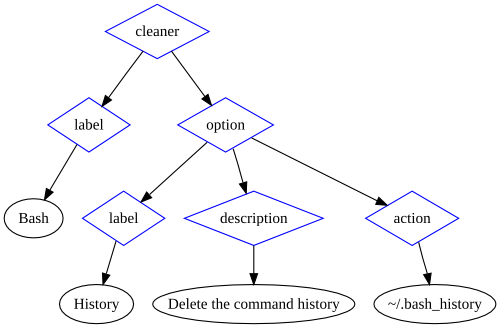
I introduce to you Cleaner Markup Language (also called CleanerML), BleachBit's new cleaner definition system based on XML. Originally all cleaners were written in Python code. For a new project, that was fine, but BleachBit has grown and matured. Most cleaners can be defined by labels, descriptions, and three types of actions, so they are best written as documents instead of as code. The new system allows easier contributions, uses better code design, and provides a platform for future enhancements.

A newer version of this information is available at BleachBit Documentation: CleanerML

Writing your own cleaner

To write your own cleaner, start by reviewing the existing CleanerML files, the example, and the XML Schema. They are all included in the source package starting with BleachBit 0.4.0 (coming soon). Until the release, you can check out the SVN trunk.

The markup language is simple and should be intuitive. Here's a graphic representation of the Bash history cleaner:

Graphic illustration of the BleachBit Cleaner Markup Language document for the Bash history cleaner

To validate your cleaner, copy it to the cleaners directory in the source tree, and then run:

make pretty
make tests

Using your own cleaners

Simply name the cleaner with the extension .xml and place it in ~/.config/bleachbit/cleaners or /usr/share/cleaners. If you are running BleachBit from the source tree, you can also use the relative path ./cleaners/.

Submitting a cleaner

Want to share your cleaner with others? Follow this checklist:

  • It cleans a significant amount of disk space or removes files that potentially contain private information
  • It follows the guidelines in the example_cleaner.xml
  • It passes XML Schema validation

Good? Then, submit it like a code contribution.

Underestimated effort

The whole CleanerML system may have taken more work than you think. Beyond the basics of simply parsing CleanerML, many other pieces were necessary:

  • Defining CleanerML
  • Writing an XML Schema to validate CleanerML
  • Writing a generic system for performing actions (different ways of deleting files)
  • Writing a system to extract text from CleanerML for translation
  • Extending the translation extraction to suppress strings of proper nouns that should not be translated such as Bash and GIMP
  • Conceived and implementing a security system to prevent tampering
  • Adding makefile targets to reformat and to validate CleanerML
  • Creating an example CleanerML with annotations
  • Converting many of the existing cleaners to the new system
  • Writing guidelines for cleaner labels and descriptions
  • Updating descriptions to meet new guidelines
  • Updating translations for those descriptions
  • Writing this article :)

All this work has delayed the weekly release cycle.

Looking forward

Now that cleaners are documents, one of the next steps is creating a simple graphical interface for users to create their own cleaners.

With all the new cleaners, the BleachBit user interface feels cluttered. The likely next step is extending CleanerML to define categories and extending the UI to filter by those categories.

Sunday, February 15, 2009

BleachBit on Windows

Who says Linux should get all the open source apps? Successful cross-platform applications such as Firefox and OpenOffice.org reduce the barrier to switch from Windows to Linux, so what would it take to get BleachBit running on Windows?

BleachBit requires Python, PyGTK, and GTK. Though I never worked with GTK, I strategically these dependencies because they are cross platform and standard on most Linux distributions. However, installing this software stack on Windows is non-trivial. For example, GRAMPS requires the same stack, and the installation instructions require six installation packages totaling about 30MB—far too big and complex. Compare that to Linux where BleachBit is one package under 100KB because the dependencies are already there. Gourmet Recipe Manager seems to have fit all of PyGTK and friends in one Windows package of about 12MB: that could be tolerable but is still large.

Another option is writing the front end in native Windows code to eliminate the GTK+ dependency and help Windows users feel at home. (Firefox and OpenOffice.org use native widgets for the same reason.) Though maintaining two GUIs is not generally desirable, only 20% of the code is the PyGTK GUI, which is also modular, so this is feasible. Transmission (the BitTorrent client) maintains native GUIs for Linux, Windows, and Mac, but they probably have more developers. Using Python to access the BleachBit backend and to write the new Windows frontend could be accomplished with IronPython. On a whim, I tried to run a BleachBit unit test, which I was surprised to find passed on Windows 7 beta:

The startup was painfully slow and it looks like the unit test should have actually failed, but it was a pleasant surprise to see it get that far. It seems IronPython can even create .EXE's (with some dependencies).

Another option is wxPython: writing code once in Python creates native GUIs for Linux, Mac, Windows, and other systems. I have experience with wxWidgets (which wxPython uses), but there are still two problems. First, wxPython is not standard on Linux, and the dependencies for Linux and Windows are large (3-10MB). This is better for Windows than GTK, but it's a little worse for Linux.

Originally I considered many options including Python with GTK, C++ with wxWidgets, and C#.NET. There are simply no perfect choices for a high-level, cross-platform language with native GUI that is already installed standard on Linux and Windows. C#.NET is the closest choice, but again there are pros and cons. It's relatively standard on Windows and Linux (coming standard on Fedora, Ubuntu, and others), but some Linux users are allergic to it because of the connection with Novell and Microsoft. Worse of all, the GTK GUI is not standard on Windows, and on Linux it GTK is practically a necessity because Mono WinForms is so ugly.

In conclusion, BleachBit is not coming to Microsoft Windows soon. BleachBit will continue to focus on Linux, and the biggest short-term platform change will be supporting the new Debian 5, released just yesterday.

Future article: BleachBit on Windows Vista (May 2009).

Tuesday, February 3, 2009

Building in virtual Ubuntus

Developing Linux applications has a few pains. One pain is the the variety of Linux distributions: there are many popular distributions which release new versions frequently. That requires a lot of testing and packaging effort. Though I prefer Linux overall, Microsoft Windows is attractive because Windows desktop application development is focused on one "distribution" (Windows desktop series) which releases new versions infrequently (a joy for testing!), so today that means only two environments: XP and Vista. The second pain is each distribution has its own particular packaging requirements. For the last BleachBit release, I single-handedly produced 18 installation packages for seven Linux distributions. This volume could not be accomplished without special tools and automation.

To develop, test, and package BleachBit, I run nine virtual machines in Sun Microsystem's VirtualBox. Though a long-time Fedora user, I quickly realized most BleachBit users (roughly 90%) use Ubuntu, so now six of my VMs run Ubuntu 6.06 through 9.04. I also build many packages using Novell's openSUSE Build Service (OBS): it builds .rpm and .deb files for CentOS, Debian, Fedora, Mandriva, openSUSE, Red Hat, and Ubuntu. Regrettably the Ubuntu 8.10 build always fails on OBS—either because of a bug in OBS or maybe because of my own fault—so I build Ubuntu 8.10 locally.

Furthermore, I often restore the virtual machines to a pristine state (using VirtualBox snapshots) which destroys build environment, so I developed the following scripts which accelerate restoration of the build environment.

First, I install sshfs (which makes it easy to run the build scripts stored on my physical machine):

sudo apt-get install sshfs

Then, I mount my VM sharing directory (which contains build scripts and the BleachBit source code):

mkdir ~/tmp
sshfs andrew@10.0.2.2:/home/andrew/tmp ~/tmp

Then, I run a script from ~/tmp which installs the build software dependencies:

# necessary
apt-get install build-essential dh-make debhelper devscripts fakeroot

# nice to have
apt-get install mc vim-full

Finally, I run the following script which extracts the BleachBit source tarball, creates the build environment, sets up some compatibility between openSUSE Build Service and Ubuntu, and builds the package.

#!/bin/bash

# Handle fatal errors.
function fail {
 echo $1
 notify-send -u critical $1
 exit 1
}

# Check which version of Ubuntu is running.
RELEASE=`grep DISTRIB_RELEASE /etc/lsb-release | cut -b17-`
echo "Detected version distribution version $RELEASE"

mkdir ~/bleachbit
cd ~/bleachbit
# Extract the source code tarball.
tar xjvf ~/tmp/vm/bleachbit*.tar.bz2 || fail "tar failed"
cd ~/bleachbit/bleachbit-?.?.? || fail "'cd' failed"
# Create .deb packaging directory.
mkdir debian
cd debian
# Copy .deb packaging files.
cp ~/tmp/vm/debian/* .
# Create links because openSUSE Build Service and dpkg like different names.
ln -s debian.control control
ln -s debian.rules rules
ln -s debian.changelog changelog
cd ~/bleachbit/bleachbit-?.?.?
# Ubuntu 6.06 doesn't have Python central, so remove it.
if [[ "x$RELEASE" == "x6.06" ]];
then
 echo "Applying Ubuntu 6.06 changes"
 cd debian
 sed -i -e 's/, python-central//g' control
 sed -i -e 's/, python-central//g' bleachbit.dsc
 sed -i -e 's/dh_pycentral//g' rules
 cd ..
fi
# Build.
debuild
# Check build.
cd ~/bleachbit
[[ ! -e *deb ]] || fail "no .deb files"
# Lintian performs checks against a database of packaging rules.
lintian *deb

That save a lot of time, and I am glad to be developing for Linux!

Tuesday, December 30, 2008

Myth: Linux Doesn't Need a Registry Cleaner

Some say Linux's .rpm and .deb installation packages uninstall cleanly, so there is no need for any registry cleaners like CCleaner. Here are a few counterexamples to the myth:

OpenOffice.org

Years ago you installed OpenOffice.org version 1, and since you've upgraded to version 3. Now you wonder why Firefox still associates .doc files with OpenOffice.org version 1, which you long ago deleted.

OpenOffice.org didn't support .rpm or .deb installations until version 2. Version 1 copied files (including file associations and menu entries) to the user's home directory.

RealPlayer

For users without root privileges (or just for convenience), RealPlayer11GOLD.bin installs itself to the user's home directory. Unless you use an arcane command to uninstall RealPlayer, dozens of files remain in ~/.local. I counted three menu entry .desktop files, 20 file association .desktop files, 206 PNG icons, and some translations.

Beagle

Install Beagle (an indexing search tool), and it may add itself to ~/.config/autostart/, a directory for automatically starting applications with the window manager (GNOME or KDE). Then, uninstall Beagle using the standard .rpm or .deb removal method. However, the package removal method doesn't touch ~/.config/autostart/.

Wine

Install a Windows application on Linux though Wine, and Wine will integrate the Windows applications with your Linux applications. Convenient! Now, as is common with Wine, delete ~/.wine/, but the broken menu entries remain.

Unfortunately GNOME and Wine doesn't handle this situation gracefully. If you click on any one of these shortcuts, there is no error message whatsoever. Technical, the shortcut points to Wine, which is still installed, so GNOME is not aware of an error. Wine prints an error message to stderr, but that's never shown on the screen. Also, GNOME doesn't support menu editing through the intuitive right-click command.

Conclusion

These are just a few examples of why Linux needs a smart cleaner. It's true that there is no central "Linux registry" like Windows has, but Linux certainly does have multiple systems for registering menu entries, shortcuts, file associations, etc.

The new BleachBit 0.2.0 cleans the .desktop files from the above examples. No, there is no promise your system will run much faster. And no, it doesn't clean everything yet---remember "Release early, release often"---but tomorrow's BleachBit will go even further.