Showing posts with label major. Show all posts

Sunday, August 2, 2009

BleachBit 0.6.0 released

Version 0.6.0 is a major release of BleachBit, the free and open source file and privacy cleaner for Linux and Windows. This release includes new and improved cleaners, a safety feature, enhanced CleanerML for writing new cleaners, bug fixes, small performance improvements, and improved translations.

Changes

The following changes are included since 0.5.4:

  • Stay alert: the Delete and Preview buttons are swapped, so the order is now more logical.
  • Clean the typed history in Opera.
  • Clean Opera 10 beta.
  • Refuse to clean these applications while they are running: APT, Epiphany, Evolution, Firefox, Google Chrome, and Skype.
  • When previewing or deleting, the list of files continuously scroll to the ends providing a real-time status.
  • In case of permissions error when shredding a file, fall back to simple delete.
  • Clean Pidgin cached buddies' avatars thanks to Danilo Piazzalunga.
  • Add SQLite vacuuming action to CleanerML.
  • Change to a plugin-based action-handling system. This change is not visible to end users, but it makes it easier to add new types of cleaners in CleanerML. Already this system is used for SQLite vacuuming and for APT.
  • Make small performance improvements.
  • Fix some potential crashes on startup.
  • Specific to Linux
    • Clean APT as if running apt-get clean thanks to MixCool.
    • Clean APT by running apt-get autoremove.
    • Clean Downloader for X (d4x) thanks to MixCool.
    • Clean EasyTag thanks to juancarlospaco and MixCool.
    • Clean Evolution thanks to MixCool.
    • Clean Liferea.
  • Specific to Windows
    • BleachBit for Microsoft Windows is no longer considered a preview release.
    • Clean more MRUs for Windows Media Player.
    • Clean more Adobe Reader MRUs.
    • Empty the Recycle Bin.
    • Delete locked files on Windows by marking them for deletion when Windows restarts. This particularly helps deleting Internet Explorer's index.dat files. So far deleting locked files works better on Windows XP than on Vista.
    • Automatically detect the language thanks to Adrián García. The setting can be changed in Control PanelRegional and Language OptionsStandards and formats.
    • Fix localization of GTK+ itself. This means a more thorough translation.

Translations

  • Add Galician thanks to Jon Amil.
  • Add Indonesian thanks to Ramdhani Fathurrohman.
  • Add Romanian thanks to Catalin Fluturel.
  • Add Swedish thanks to Jens Stääf.
  • Update Arabic thanks to Dilmi Fethi and MaXeR.
  • Update Brazilian Portuguese thanks to Andrius Gabriel da Luz, Felipe Tanus, and Michele Medeiros.
  • Update Bulgarian thanks to Svetoslav Stefanov.
  • Update Czech thanks to Roman Horník.
  • Update Dutch thanks to Rob.
  • Update French thanks to Matthieu Martin, Sultan Rahi, Pierre Slamich, and j0nnnnn0.
  • Update German thanks to MixCool.
  • Update Hebrew thanks to Yaron.
  • Update Hindi thanks to Asutosh Dash.
  • Update Italian thanks to briga, Luca Falavigna, Marco Donato Torsello, and Santiago.
  • Update Polish thanks to Dariusz Jakoniuk.
  • Update Portuguese thanks to Jon Amil.
  • Update Russian thanks to Ilia Lilov aka lilovip.
  • Update Serbian thanks to Roman Horník.
  • Update Slovak thanks to Roman Horník.
  • Update Polish thanks to Darek Jakoniuk.
  • Update Spanish thanks to juancarlospaco.
  • Update Turkish thanks to Ufuk Yıldırım.

Known issues

  • On GNOME 2.26 (Ubuntu 9.04), deleting the recent documents list files is not enough to clear the list because GNOME retains it also in memory. As a workaround, you may run the following command to restart the panel after BleachBit deletes the file:
    killall gnome-panel

Screenshots

BleachBit 0.6.0 on Ubuntu 9.04 showing the Firefox preview
BleachBit on Ubuntu 9.04 showing the Firefox preview
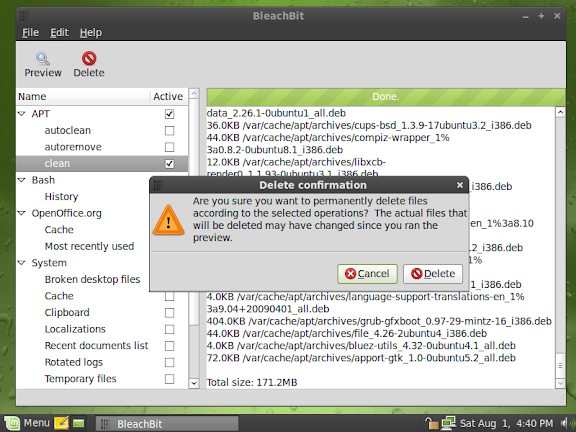
BleachBit 0.6.0 on Linux Mint 7
BleachBit on Linux Mint 7 showing a preview and the delete confirmation dialog
BleachBit 0.6.0 in Indonesian on Fedora 11 (Leonidas)
BleachBit in Indonesian on Fedora 11 (Leonidas)
BleachBit 0.6.0 in Romanian (limba română) on Ubuntu 9.04
BleachBit in Romanian on Ubuntu 9.04 showing the Firefox preview
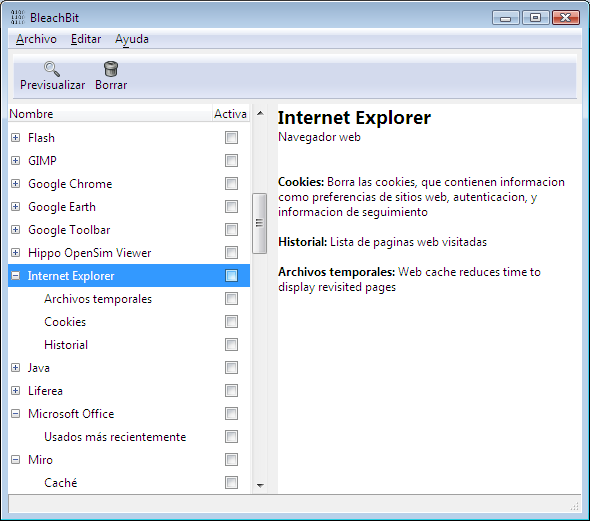
BleachBit 0.6.0 on Windows Vista in Spanish (Español) showing the Internet Explorer description
BleachBit on Windows Vista in Spanish showing the Internet Explorer description
BleachBit 0.6.0 on Windows Vista in Galician (Galego) showing the Firefox preview
BleachBit on Windows Vista in Galician showing the Firefox preview

See more screenshots on the new screenshots web page.

Download

Download BleachBit now. Installation packages are ready for 20 platforms including CentOS, Debian, Fedora, Mandriva, openSUSE, Red Hat, Ubuntu, and Windows.

Friday, May 29, 2009

BleachBit 0.5.0 released

Version 0.5.0 is a major release of BleachBit, the free and open source file and privacy cleaner for Linux and Windows. BleachBit aims to be an easy, advanced, and smart way to clean junk including cache, cookies, Internet history, localizations, logs, and temporary files.

This is an unstable release intended only for testing.

Changes

The following changes are included since 0.4.2:

  • Add support for Microsoft Windows XP, Vista, and 7.
  • Add convenient Windows installer (with all the dependencies included) and uninstaller .
  • Add cleaners for Google Chrome, Microsoft Internet Explorer, and Safari.
  • Clean more cookies created by Macromedia/Adobe Flash.
  • Enhance CleanerML to hide cleaners on unsupported operating systems (such as hiding WINE and Rhythmbox on Windows).
  • Fixed bug "Bookmarks in Firefox can't be saved.".
  • Change the cleaning and preview system from a thread to an idle function to support Windows. One nice side effect is closing BleachBit (with the X in the corner) during a cleaning operation immediately closes BleachBit and stops further cleaning. Another side effect is this change facilitates command line invocation of BleachBit (to be added later).
  • Add Brazilian Portuguese translation thanks to A. Gabriel.
  • Add Czech and Slovak translations thanks to Roman Horník.
  • Add Serbian translation thanks to turncoat.
  • Update Arabic translation thanks to MaXer.
  • Update Danish translation thanks to Jimmy Frydkær Jensen.
  • Update French translation thanks to Mathieu Pasquet.
BleachBit 0.5.0, the free and open source file and privacy cleaner, cleaning Firefox 3 cache on Windows 7

Known issues

  • Installation may fail on Vista and Windows 7 with the error 'Error opening file for writing.' Make sure you right click on the installer .exe and choose 'Run as Administrator.'
  • Internet Explorer index.dat files cannot be cleaned because they are in use (locked) by a running process. You will see a red error. (Other cleaner programs clean the MSIE index.dat files during the user login process before MSIE starts.)
  • When running a preview in Windows 7 (and probably Vista) some files are listed twice. (This is harmless, but it inflates the preview size.)
  • A few cleaners don't clean anything on Windows because they aren't yet updated for Windows.
  • Localizations may not work on Windows, so BleachBit may appear in English even for languages with translations (over 10 languages). Would you please let me know?
  • The Windows installer is a bit too large (because the GTK+ runtime is large).
  • On Windows when there is an exception (such as when a file can't be deleted), py2exe throws up an error dialog about a log file when exiting BleachBit.
  • On Windows shredding doesn't work.
  • Windows virus scanners may not like that BleachBit uses UPX executable compression to reduce its disk space footprint. Please report any issues.
  • BleachBit may delete TrueCrypt containers on Linux.
  • Some unit tests may fail on Windows.
  • The taskbar button on Windows 7 has the wrong icon.
  • Installing BleachBit in the non-default location may cause it to lose some cleaners.

Download

Download BleachBit now. Installation packages are ready for 18 platforms including CentOS, Debian, Fedora, Mandriva, openSUSE, Red Hat, Ubuntu, and Windows.

Monday, February 23, 2009

BleachBit 0.4.0 released

Version 0.4.0 is a major release of BleachBit, the file and privacy cleaner for Linux. BleachBit aims to be an easy, advanced, and smart way to clean junk including cache, cookies, Internet history, localizations, logs, and temporary files.

Changes

The following changes are included since 0.3.2:

  • Introduce CleanerML (Cleaner Markup Language), an XML-based system for easily creating ne cleaners.
  • Introduce cleaners for aMSN, CrossOver Chromium (Google Chrome), ELinks, emesene, GL-117, Hippo OpenSim Viewer, Midnight Commander, Recoll, Rhythmbox, Tremulous, Vuze (formerly Azureus), and WINE. Several of these were suggested and researched by juancarlospaco.
  • Enhance Second Life Viewer cleaner to also clean logs.
  • Clarify that favicons will be deleted when deleting Firefox places (bug #328278).
  • Introduce a simple README file.
  • Sort the cleaner tree by the case-insensitive display name instead of an internal code name. For English speakers, this puts non-capitalized cleaners like aMSN in the right place, and for non-English speakers it fixes sorting of non-English cleaner names such as System and Thumbnails.
  • Fix packaging for SLES 9 and SLE 10: they incorrectly required a package not available on those systems.
  • Update translations: Bulgarian (thanks to Svetoslav Stefanov), French (Edouard Marquez), and Spanish (juancarlospaco).
  • Introduce Russian translation thanks to Vadim Peretokin.
  • Introduce installation package for the new Debian Lenny (Debian 5).
BleachBit cleaner 0.4.0 in Russian on Fedora 10 Linux

Download

Download BleachBit now. Installation packages are ready for 19 Linux distributions-versions including CentOS, Debian, Fedora, Mandriva, openSUSE, Red Hat, and Ubuntu.

Tuesday, January 27, 2009

BleachBit 0.3.0 released

Version 0.3.0 is a major release of BleachBit, the file and privacy cleaner for Linux. BleachBit aims to be an easy, advanced, and smart way to clean junk including broken menu entries, cache, cookies, Internet history, localizations, and temporary files.

Highlights

This is a major release including these changes:

  • Introduce cleaning of localizations: Go way behind localpurge, which only cleans some localizations and just for a few Linux distributions. BleachBit finds more files and works with all Linux distributions. Also, BleachBit is "safer" than localpurge because you must run BleachBit manually, and BleachBit allows you a preview.

    Note: Usually you must run as root to clean localizations!
  • Create a menu option to launch BleachBit as root on Linux distributions for which installation packages are provided. Administrator privileges are necessary to purge localizations.
  • Extend cleaning of recently used documents on Ubuntu 8.10 according to a new file standard.
  • Introduce a preferences dialog:

  • Implement secure file shredding to hide file contents (to prevent data remanence) by overwriting files. It is effective in most operations (those which delete files) and on some file systems. The standard file system Ubuntu 8.10 and Fedora 10 is ext3 with data=ordered is compatible with shredding, but it is not effective in other situations including JFS, ReiserFS, and XFS. For more information, read the man page for shred.
  • Individually describe each operation option to make it clearer what will happen: Screenshot: BleachBit describing each option for Mozilla Firefox Internet web browser cleaning: cache, cookies, form history, password, places (URLs), session restore
  • Show the actual size (not apparent size) of sparse files. This follows the default behavior of du instead of ls. Notice files are generally multiples of 4KB: even a 1B file generally occupies 4KB because of the file system allocates multiples of its block size.
  • Add new operation to clean clipboard.
  • Add Bulgarian translation from Svetoslav Stefanov.
  • Delete XChat logs in recent XChat version.
  • Fix bug that prevented some Firefox and Epiphany options from being used (i.e., some files were not deleted).
  • Fix handling of symlinks.

Smaller changes

The smaller changes include:

  • When cleaning history for OpenOffice.org, also delete the cache.
  • Improve the text window (on the right) with markup (colors and text styles) and text wrapping.
  • Show tooltips on the toolbar.
  • Various bug fixes, optimizations, and improvements to the unit tests.
  • Enable searching and fix scrolling in the operations tree view.
  • Fix thread-related bug on Ubuntu 6.06.

Download

Download BleachBit now. Installation packages are ready for 18 Linux distributions-versions including CentOS, Debian, Fedora, openSUSE and Ubuntu. Ubuntu 9.04 users: install through your native repositories.

Tuesday, December 30, 2008

BleachBit 0.2.0 released

Does Linux need a "registry cleaner"? Some say no, but that's a myth that BleachBit busts with release of version 0.2.0.

A summary of changes from BleachBit version 0.1.1 to 0.2.0:

  • Clean broken personal menu entries (.desktop files)
  • Clean Firefox session restore (crashed sessions)
  • Clean /var/tmp/ when cleaning /tmp/
  • Clean VIM's .viminfo (which contains the "clipboard" and a history including commands and files)
  • Enable Startup Notification (a visual notification to show the application is starting)
  • Improve .deb and .rpm packaging. In particular, all .deb packages now are "all" architecture (instead of i386 and amd64).
  • Introduce install packages for Mandriva and Ubuntu 8.10 (Intrepid Ibex)

Installation packages are available for 17 Linux distributions-versions. Download BleachBit now.

Wednesday, December 24, 2008

BleachBit's public debut!

BleachBit version 0.1.0 is now available for download just in time for Christmas. The source code is online right now, and very soon installation packages will be available for the most popular Linux distributions: Debian, Fedora, OpenSUSE, and Ubuntu.

BleachBit deletes unnecessary files to free valuable disk space and maintain privacy. It removes junk including cache, temporary files, and cookies. Designed for Linux systems, it wipes clean Bash, Beagle, Epiphany, Firefox, Adobe Flash, Java, KDE, OpenOffice.org, Opera, rpmbuild, XChat, and more.

BleachBit, the cleaning and privacy tool [2026: I updated the image to BleachBit 3.2.0 from 2020]

Many useful and innovative features are planned, so subscribe to updates (see the home page for details).

Download BleachBit now!