Showing posts with label development. Show all posts

Thursday, July 23, 2009

Test BleachBit 0.6.0 beta

Want to test BleachBit 0.6.0 beta? It contains numerous new features and some fixes. In particular, please test:

  • BleachBit should refuse to clean these applications while they are running: APT, Epiphany, Evolution, Firefox, Google Chrome, and Skype.
  • When previewing or deleting, the list of files should continuously scroll to the end.
  • On Linux, please test the new APT cleaner (only for Debian, Ubuntu, Linux Mint, and other apt-based systems).
  • On Linux, please test SQLite database vacuuming in Liferea.
  • On Windows, BleachBit (the application, not the installer) should automatically detect your native language and show text in the correct language (must be one of the 27 translated languages). To change the language, go to the Windows Control Panel, click on Regionalization, choose your language under Standards and Formats, and restart BleachBit.
  • On Windows XP, BleachBit should clean all of Internet Explorer without errors (which would be indicated in a red color).
  • On Windows Vista, you may see 'access denied' cleaning Internet Explorer unless you right click on the BleachBit shortcut and choose 'Run as Administrator.'
  • On Windows, BleachBit should empty the Recycle Bin of all fixed drives (i.e., not network drives, not remove-able drives, and not read-only drives).
  • There are new languages: Galician, Swedish, Romanian.

Please be aware: the positions of the Preview and Delete buttons have been swapped!

Because of the significant time it takes to prepare all the installation packages, only the following files are offered for this beta:

  • Microsoft Windows: BleachBit-0.6.0beta-Win32-install-full-gtk.exe
  • Ubuntu Hardy Heron 8.04 (Python 2.5): bleachbit_0.6.0beta-1_all_ubuntu804.deb
  • Ubuntu Jaunty Jackalope 9.04 (Python 2.6): bleachbit_0.6.0beta-1_all_ubuntu904.deb
  • Source code: bleachbit-0.6.0beta.tar.gz

[Note from 2026: the 0.6.6beta downloads were deleted a few years ago]

For other Linux distributions, you can try the most similar installation package above. For example, Ubuntu 8.10 and LinuxMint 6 and 7 users can download the Ubuntu 8.04 package. Alternatively, run from source, which is not very difficult.

Check back soon for the final release with the detailed release notes (as usual).

Friday, July 17, 2009

Update to translators

Thank you to all translators for keeping the translations complete and updated. BleachBit is now in 25 languages! Several things have happened and are happening to make translators easier and better:

  • The new translation page gives detailed information for translating BleachBit.
  • As of today, Launchpad shows hints on certain strings. Here is an example:
    Launchpad showing translation tip for the word 'vacuum'
  • I continue to make an active effort to avoid introducing new strings and to avoid editing old strings. This reduces your work. However, some changes are unavoidable, so thanks for your patience.
  • I've reduced the number of strings by combining similar strings to reduce translators' work.
  • I've recruited help for specific new languages (Korean, Japanese, Chinese, Hindi, Romanian, Swedish) and for a few out-of-date languages on SourceForge's job postings, and many of these postings have led to new translations.
  • While BleachBit uses translations seamlessly on Linux, I'm still working on figuring out how they should work on Windows. A FAQ entry on the new documentation page describes a workaround for Windows users, so BleachBit displays words in your native language. (Let me know whether you need the workaround.)

Saturday, June 20, 2009

"Features," the new web page

BleachBit's home page has been simplistic with few details about the application. It's about time it had a page detailing its capabilities, and now it does. Check out the new BleachBit features page on the new web site hosted on Google App Engine. The page lists all the cleaners, all the cleaner options, and enumerates the advanced features you may have overlooked. The new page also gives a sneak peak in to the next version 0.5.2.

Seeing all the cleaners for both Linux and Windows on a single web page emphasizes the length of the list. In fact, I have a backlog of cleaners to review submitted by BleachBit users. Many are for applications I have never heard of. In BleachBit's menu the list of cleaners feels cluttered. Each person prefers a different applications, so a feature needed more each day is a way to automatically hide irrelevant cleaners.

Thursday, June 4, 2009

Validating secure erase

For a while, BleachBit has supported a secure erase feature by invoking the external program shred ubiquitous on Linux systems. (The secure erase feature overwrites the contents of files to prevent data recovery.) Of course, Windows doesn't come with shred, so BleachBit 0.5.1 now includes internal code to do the same. It's important to validate the new code, so we know it works as advertised.

First, the new code includes a unit test (as does much of BleachBit code). The unit test creates a file with a short, repeating pattern "abcdefghij," securely erases the file, and checks for remnants of the pattern. The unit test passes on Fedora 10 and on Windows 7.

The unit test has limitations, so I also performed a more sophisticated test. On Linux, I executed these commands to create and mount a fresh ext3 loopback filesystem:

dd if=/dev/zero of=/tmp/testfs bs=1M count=5 # 5 megabytes
/sbin/mkfs.ext3 /tmp/testfs
sudo mkdir /mnt/testfs
sudo mount -o loop /tmp/testfs /mnt/testfs/

Then, I executed this Python code to create a 3,000,000-byte file with the same repeating pattern and securely delete it with BleachBit.

import FileUtilities
import tempfile
import os

fn = "/mnt/testfs/wipeme"
f = open(fn, 'wb+')
f.write("abcdefghij" * (3 * 1000 * 100))
f.close()

FileUtilities.wipe_contents(fn)

Don't forget to unmount the file system:

sudo umount /mnt/testfs/

If the secure file eraser worked, there should now be zero copies of the repeating pattern. Indeed, there are none!

[a@z bleachbit]$ grep abc /tmp/testfs
[a@z bleachbit]$ grep efg /tmp/testfs
[a@z bleachbit]$ strings /tmp/testfs
lost+found
wipeme
lost+found
wipeme

Compared to Gutmann-35

BleachBit's secure erase method is a single pass with zeros, so why doesn't BleachBit use the Gutmann-35 method? The Guttman secure deletion method gives some people a false sense of security. A long time ago (in the technology timeline) the 35-pass Gutmann method was designed for MFM/RLL hard disk drives. My last computer to include a MFM hard drive was purchased in 1989. Time has passed and technology has changed. Today's PATA/IDE and SATA hard drives are much more dense, and NIST, the NSA, and other experts now agree that a single pass to overwrite data is sufficient.

However, there are two exceptions. First, erasure of individual files (by any erasure method) is not effective in some situations such as using ext3 with the non-default option data=journal. Also, modern hard drives sometimes move data transparently to the operating system. In such cases, it is necessary to either securely wipe the entire disk (in the case of the former) or physically destroy it (in case of the latter).

That said, BleachBit's method is much quicker than Guttman-35 and generally equally effective for everyday use. Generally files deleted securely by BleachBit cannot be recovered by any undelete or other file recovery methods. If you are worried about highly-motivated and well-resourced people watching you, don't forget to take your prescription. Besides, "they" have more convenient ways of watching you.

Sunday, May 31, 2009

Building the BleachBit installer for Windows

Building BleachBit 0.5.0 for Windows is relatively easy. The biggest challenge is installing the many dependencies. The end result is a single-file, redistributable installer which contains all dependencies: GTK+, PyGTK, etc. Some other projects with the same dependencies install the dependencies with a sub-installer, but BleachBit's approach is seamless.

Dependencies

Install these dependencies:

  • Python 2.5.4. Do not use Python 2.6.2 because it causes the error
    "This application has failed to start because the application configuration is incorrect. Reinstalling the application may fix this problem"
    related to a MSVCR90.DLL issue.)
  • NSIS 2.44
  • py2exe 0.6.9
  • PyCairo 1.4
  • PyGObject 2.14
  • PyGTK 2.12
  • GTK+ 2.12 [broken was removed]

This GTK+ runtime is old. Newer versions may work but haven't been tested yet.

Build process

After installing the dependencies, build and package BleachBit like this:

  1. Extract BleachBit source tarball or retrieve the source by SVN.
  2. Change to the directory with setup.py.
  3. Optionally, unzip upx.exe from UPX 3.03 to this directory. UPX compresses the executables and DLLs. While UPX may increase the size of the installer slightly (because of the double compression), it saves disk space by reducing the final installation footprint.
  4. If you repeat the installer build process often, run this command to save time:
    upx --best c:\gtk\bin\*.*
    
  5. Compile the gettext localization files from .po to .mo format with this command:
    make -C po local 
    
    Microsoft Windows doesn't have make, so you may need a Cygwin environment; I use a Linux machine with file sharing setup between Windows and Linux.
  6. If you are using BleachBit version 0.5.0 exactly, replace setup_py2exe.bat with revision 426. (This revision will be included in BleachBit 0.5.1.)
  7. Run setup_py2exe.bat to clean any old builds, invoke setup.py and py2exe, copy remaining files from the GTK+ runtime (py2exe misses some necessary GTK+ files), compress executables with UPX, purge several megabytes of unnecessary GTK+ locales, and invoke NSIS to build the installer.

You're done. Now test the installer on a fresh machine (without any of these dependencies installed.)

Other uses

Installing these dependencies has other uses than building a redistributable package. The environment is useful for developing BleachBit. Also, you can run new versions of BleachBit without having to re-download and re-install the large GTK+ runtime for each BleachBit release: this saves about 98% of the download size—not that it matters so much these days with high-speed Internet.

Sunday, May 17, 2009

Bookmarks can't be saved in Firefox 3

Thank you to Rob from Holland who (not only donated to BleachBit but) reported this bug. When deleting the Places database in Firefox version 3 using BleachBit 0.4.2, it's not possible to save new bookmarks. The bookmarks disappear when Firefox is restarted.

A Mozilla knowledge base article gives the solution. If you suffer this bug in BleachBit 0.4.2, close Firefox and run this command:

rm ~/.mozilla/firefox/*/bookmarkbackups/*json

The explanation: Firefox tries to reconstruct the missing places.sqlite file from the JSON backups.

The fix is applied for BleachBit 0.5.0. For older versions, you may apply this patch [link broken].

Monday, May 11, 2009

BleachBit on Windows Vista

With a change to replace threading with use of PyGTK's idle event loop, BleachBit starts on Microsoft Windows.

BleachBit doesn't do anything useful yet on Windows because the file paths it currently knows are specific to Linux: that's easy to fix. The part I am not looking forward to is trying to bundle GTK+, Python, PyGTK, PyCairo, and PyGObject into a simple installer, and then I have convince users to download 24MB of runtime to run a 100KB program. Today's modern system have plenty of bandwidth and disk space, but still that's ironic situation for a system cleaner.

Previous post: BleachBit on Windows (February 2009).

Update: BleachBit 0.5.0 released with support for Microsoft Windows.

The new thread-free code also paves the way to implement a command-line interface (CLI) one day.

Thursday, February 19, 2009

Cleaner Markup Language

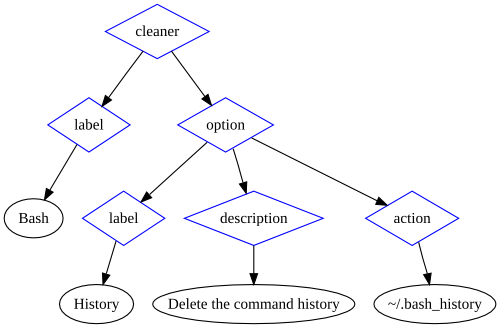
I introduce to you Cleaner Markup Language (also called CleanerML), BleachBit's new cleaner definition system based on XML. Originally all cleaners were written in Python code. For a new project, that was fine, but BleachBit has grown and matured. Most cleaners can be defined by labels, descriptions, and three types of actions, so they are best written as documents instead of as code. The new system allows easier contributions, uses better code design, and provides a platform for future enhancements.

A newer version of this information is available at BleachBit Documentation: CleanerML

Writing your own cleaner

To write your own cleaner, start by reviewing the existing CleanerML files, the example, and the XML Schema. They are all included in the source package starting with BleachBit 0.4.0 (coming soon). Until the release, you can check out the SVN trunk.

The markup language is simple and should be intuitive. Here's a graphic representation of the Bash history cleaner:

Graphic illustration of the BleachBit Cleaner Markup Language document for the Bash history cleaner

To validate your cleaner, copy it to the cleaners directory in the source tree, and then run:

make pretty
make tests

Using your own cleaners

Simply name the cleaner with the extension .xml and place it in ~/.config/bleachbit/cleaners or /usr/share/cleaners. If you are running BleachBit from the source tree, you can also use the relative path ./cleaners/.

Submitting a cleaner

Want to share your cleaner with others? Follow this checklist:

  • It cleans a significant amount of disk space or removes files that potentially contain private information
  • It follows the guidelines in the example_cleaner.xml
  • It passes XML Schema validation

Good? Then, submit it like a code contribution.

Underestimated effort

The whole CleanerML system may have taken more work than you think. Beyond the basics of simply parsing CleanerML, many other pieces were necessary:

  • Defining CleanerML
  • Writing an XML Schema to validate CleanerML
  • Writing a generic system for performing actions (different ways of deleting files)
  • Writing a system to extract text from CleanerML for translation
  • Extending the translation extraction to suppress strings of proper nouns that should not be translated such as Bash and GIMP
  • Conceived and implementing a security system to prevent tampering
  • Adding makefile targets to reformat and to validate CleanerML
  • Creating an example CleanerML with annotations
  • Converting many of the existing cleaners to the new system
  • Writing guidelines for cleaner labels and descriptions
  • Updating descriptions to meet new guidelines
  • Updating translations for those descriptions
  • Writing this article :)

All this work has delayed the weekly release cycle.

Looking forward

Now that cleaners are documents, one of the next steps is creating a simple graphical interface for users to create their own cleaners.

With all the new cleaners, the BleachBit user interface feels cluttered. The likely next step is extending CleanerML to define categories and extending the UI to filter by those categories.

Sunday, February 15, 2009

BleachBit on Windows

Who says Linux should get all the open source apps? Successful cross-platform applications such as Firefox and OpenOffice.org reduce the barrier to switch from Windows to Linux, so what would it take to get BleachBit running on Windows?

BleachBit requires Python, PyGTK, and GTK. Though I never worked with GTK, I strategically these dependencies because they are cross platform and standard on most Linux distributions. However, installing this software stack on Windows is non-trivial. For example, GRAMPS requires the same stack, and the installation instructions require six installation packages totaling about 30MB—far too big and complex. Compare that to Linux where BleachBit is one package under 100KB because the dependencies are already there. Gourmet Recipe Manager seems to have fit all of PyGTK and friends in one Windows package of about 12MB: that could be tolerable but is still large.

Another option is writing the front end in native Windows code to eliminate the GTK+ dependency and help Windows users feel at home. (Firefox and OpenOffice.org use native widgets for the same reason.) Though maintaining two GUIs is not generally desirable, only 20% of the code is the PyGTK GUI, which is also modular, so this is feasible. Transmission (the BitTorrent client) maintains native GUIs for Linux, Windows, and Mac, but they probably have more developers. Using Python to access the BleachBit backend and to write the new Windows frontend could be accomplished with IronPython. On a whim, I tried to run a BleachBit unit test, which I was surprised to find passed on Windows 7 beta:

The startup was painfully slow and it looks like the unit test should have actually failed, but it was a pleasant surprise to see it get that far. It seems IronPython can even create .EXE's (with some dependencies).

Another option is wxPython: writing code once in Python creates native GUIs for Linux, Mac, Windows, and other systems. I have experience with wxWidgets (which wxPython uses), but there are still two problems. First, wxPython is not standard on Linux, and the dependencies for Linux and Windows are large (3-10MB). This is better for Windows than GTK, but it's a little worse for Linux.

Originally I considered many options including Python with GTK, C++ with wxWidgets, and C#.NET. There are simply no perfect choices for a high-level, cross-platform language with native GUI that is already installed standard on Linux and Windows. C#.NET is the closest choice, but again there are pros and cons. It's relatively standard on Windows and Linux (coming standard on Fedora, Ubuntu, and others), but some Linux users are allergic to it because of the connection with Novell and Microsoft. Worse of all, the GTK GUI is not standard on Windows, and on Linux it GTK is practically a necessity because Mono WinForms is so ugly.

In conclusion, BleachBit is not coming to Microsoft Windows soon. BleachBit will continue to focus on Linux, and the biggest short-term platform change will be supporting the new Debian 5, released just yesterday.

Future article: BleachBit on Windows Vista (May 2009).

Tuesday, February 3, 2009

Building in virtual Ubuntus

Developing Linux applications has a few pains. One pain is the the variety of Linux distributions: there are many popular distributions which release new versions frequently. That requires a lot of testing and packaging effort. Though I prefer Linux overall, Microsoft Windows is attractive because Windows desktop application development is focused on one "distribution" (Windows desktop series) which releases new versions infrequently (a joy for testing!), so today that means only two environments: XP and Vista. The second pain is each distribution has its own particular packaging requirements. For the last BleachBit release, I single-handedly produced 18 installation packages for seven Linux distributions. This volume could not be accomplished without special tools and automation.

To develop, test, and package BleachBit, I run nine virtual machines in Sun Microsystem's VirtualBox. Though a long-time Fedora user, I quickly realized most BleachBit users (roughly 90%) use Ubuntu, so now six of my VMs run Ubuntu 6.06 through 9.04. I also build many packages using Novell's openSUSE Build Service (OBS): it builds .rpm and .deb files for CentOS, Debian, Fedora, Mandriva, openSUSE, Red Hat, and Ubuntu. Regrettably the Ubuntu 8.10 build always fails on OBS—either because of a bug in OBS or maybe because of my own fault—so I build Ubuntu 8.10 locally.

Furthermore, I often restore the virtual machines to a pristine state (using VirtualBox snapshots) which destroys build environment, so I developed the following scripts which accelerate restoration of the build environment.

First, I install sshfs (which makes it easy to run the build scripts stored on my physical machine):

sudo apt-get install sshfs

Then, I mount my VM sharing directory (which contains build scripts and the BleachBit source code):

mkdir ~/tmp
sshfs andrew@10.0.2.2:/home/andrew/tmp ~/tmp

Then, I run a script from ~/tmp which installs the build software dependencies:

# necessary
apt-get install build-essential dh-make debhelper devscripts fakeroot

# nice to have
apt-get install mc vim-full

Finally, I run the following script which extracts the BleachBit source tarball, creates the build environment, sets up some compatibility between openSUSE Build Service and Ubuntu, and builds the package.

#!/bin/bash

# Handle fatal errors.
function fail {
 echo $1
 notify-send -u critical $1
 exit 1
}

# Check which version of Ubuntu is running.
RELEASE=`grep DISTRIB_RELEASE /etc/lsb-release | cut -b17-`
echo "Detected version distribution version $RELEASE"

mkdir ~/bleachbit
cd ~/bleachbit
# Extract the source code tarball.
tar xjvf ~/tmp/vm/bleachbit*.tar.bz2 || fail "tar failed"
cd ~/bleachbit/bleachbit-?.?.? || fail "'cd' failed"
# Create .deb packaging directory.
mkdir debian
cd debian
# Copy .deb packaging files.
cp ~/tmp/vm/debian/* .
# Create links because openSUSE Build Service and dpkg like different names.
ln -s debian.control control
ln -s debian.rules rules
ln -s debian.changelog changelog
cd ~/bleachbit/bleachbit-?.?.?
# Ubuntu 6.06 doesn't have Python central, so remove it.
if [[ "x$RELEASE" == "x6.06" ]];
then
 echo "Applying Ubuntu 6.06 changes"
 cd debian
 sed -i -e 's/, python-central//g' control
 sed -i -e 's/, python-central//g' bleachbit.dsc
 sed -i -e 's/dh_pycentral//g' rules
 cd ..
fi
# Build.
debuild
# Check build.
cd ~/bleachbit
[[ ! -e *deb ]] || fail "no .deb files"
# Lintian performs checks against a database of packaging rules.
lintian *deb

That save a lot of time, and I am glad to be developing for Linux!