Friday, August 28, 2009

BleachBit 0.6.3 released

BleachBit 0.6.3 hides metadata of previously-deleted files, deletes Windows log files, fixes bugs, and updates 16 translations.

Changes

The following changes are included since 0.6.1:

  • More thoroughly wipe free disk space. BleachBit now tries to wipe inodes on Linux and the NTFS MFT (Master File Table) on Windows to hide metadata of deleted files. The metadata includes details such as the filename, file size, and modification date. Initial testing shows this is effective on ext3 (the most common Linux filesystem), ext4, and Microsoft's NTFS.
  • In case of certain errors deleting a file or directory, BleachBit will no longer skip other files that can be deleted.
  • Specific to Windows
    • Delete Windows system log files.
    • Delete Microsoft Office 2007 diagnostic log files.
    • Don't stop deleting when a directory cannot be removed because it is not empty.
    • Include better links in Control Panel's Add/Remove Programs.

Translations

  • Update Arabic thanks to Nizar Kerkeni and MaXeR.
  • Update Brazilian Portuguese thanks to Sidney Ribeiro Júnior.
  • Update Catalan thanks to Oriol Gonzalez.
  • Update Croatian thanks to Miro Glavić.
  • Update Czech thanks to Roman Horník.
  • Update Dutch thanks to Rob.
  • Update French thanks to Jean-Luc Aufranc and S. Matrunchyk aka SkyMan.
  • Update German thanks to MixCool.
  • Update Hebrew thanks to Yaron.
  • Update Hungarian thanks to Gergely Szarka.
  • Update Italian thanks to Luca Falavigna.
  • Update Portuguese thanks to Carlos Geadas.
  • Update Russian thanks to S. Matrunchyk aka SkyMan.
  • Update Spanish thanks to juancarlospaco and Pablo Ponce.
  • Update Thai thanks to shane.fox.
  • Update Ukrainian thanks to S. Matrunchyk aka SkyMan.

Screenshots

BleachBit 0.6.3 in Korean:
BleachBit on Ubuntu in Korean showing Firefox

Website changes

I am testing a new content management system at bleachbit.sourceforge.net. If you notice errors or slowness on the website, please let me know.

The new website has a nice forum system. Anonymous posting is allowed, but user registration does not work yet (the email cannot be delivered) but user registration is encouraged.

Download

Download BleachBit now. Installation packages are ready for 20 platforms including CentOS, Debian, Fedora, Mandriva, openSUSE, Red Hat, Ubuntu, and Windows.

Monday, August 17, 2009

BleachBit 0.6.1 released

BleachBit 0.6.1 overwrites free disk space, cleans Nautilus and gPodder, cleans more of Yum, fixes bugs, and includes improved translations.

Changes

The following changes are included since 0.6.0:

  • Overwrite free disk space. Files are deleted "insecurely" in four typical situations: in BleachBit with shredding disabled, with certain BleachBit operations that don't support shredding, with filesystems that don't support shredding, and most deletions outside of BleachBit. These files can often be undeleted. Even if you use the Linux ext3 filesystem, for example, which doesn't support undelete, the file contents can sometimes still be recovered with only moderate technical skill. The new BleachBit option overwrites all the free space to prevent recovery.

    Besides privacy, a popular use for wiping free space is dramatically increasing compression ratios for archiving whole disk images ("ghost" backups) and virtual machines.

    Before using the option, check its settings in the preferences menu. This option is slow: each gigabyte of free takes 15 seconds on my machine.

  • When shredding files manually (from the file menu), show a preview and a list of those that were actually deleted.
  • When confirming delete, treat closing the confirmation dialog the same as cancelling.
  • Cleanup code.
  • Specific to Linux
    • Vacuum the gPodder SQLite database and delete the cache thanks to shane.fox.
    • Erase Nautilus usage history thanks to MixCool. Specifically, this cleaner deletes the saved session files and "metafiles." Besides taking a fair amount of space, these XML files record usage activity as a side effect of tracking Nautilus window positions and emblems. You may be surprised what this cleaner uncovers.
    • Work around a bug in GNOME 2.26, so the recent documents list can be deleted.
    • Vacuum the Yum SQLite databases (for Fedora, Red Hat, and CentOS).
    • When running yum clean all enable all repositories.
    • Require package python-xml on OpenSUSE 11.1 (reported by rvpittman).
  • Specific to Windows
    • Include a much improved rendition of the application logo.

Translations

Attention translators: Please read the news on the translations page regarding upcoming changes.

  • Add Croatian thanks to Miro Glavić.
  • Add Korean thanks to Yonghyuk Jang and bundo.
  • Add Ukrainian thanks to S. Matrunchyk aka SkyMan.
  • Add Thai thanks to shane.fox.
  • Update Arabic thanks to MaXeR.
  • Update Brazilian Portuguese thanks to Alex B. Oliveira.
  • Update Bulgarian thanks to Svetoslav Stefanov.
  • Update Catalan thanks to Oriol Gonzalez.
  • Update Croatian thanks to Miro Glavić.
  • Update Czech thanks to Roman Horník.
  • Update Dutch thanks to Rob.
  • Update French thanks to Christophe CATARINA and Pierre Slamich.
  • Update German thanks to MixCool.
  • Update Hebrew thanks to Yaron.
  • Update Hungarian thanks to Gergely Szarka.
  • Update Italian thanks to Luca Falavigna.
  • Update Portuguese thanks to Carlos Geadas.
  • Update Russian thanks to Ilia Lilov aka lilovip and S. Matrunchyk aka SkyMan.
  • Update Simplified Chinese thanks to yuane.
  • Update Spanish thanks to juancarlospaco.
  • Update Swedish thanks to Jens Stääf.
  • Update Polish thanks to Dariusz Jakoniuk.

Screenshots

This screenshot shows the new preferences page for selecting a path for each drive for which to shred space. A typical Linux system includes the home directory and temporary directory unless they are the same partition, in which case only one should be listed. In Windows, typically only C:\ is listed. BleachBit guesses the most appropriate settings.
BleachBit 0.6.1 preferences dialog showing new options to choose drives for which to overwrite free space (Ubuntu 9.04)
BleachBit on PCLinuxOS under KDE 3.5 showing the delete confirmation dialog:
BleachBit 0.6.1 in English on PCLinuxOS 2009
BleachBit in Croatian on Ubuntu:
BleachBit 0.6.1 in Croatian on Ubuntu 9.04 (Jaunty Jackalope)

See more screenshots.

Web site changes

I am testing a new content management system at bleachbit.sourceforge.net. If you notice errors or slowness on the web site, please let me know.

Download

Download BleachBit now. Installation packages are ready for 20 platforms including CentOS, Debian, Fedora, Mandriva, openSUSE, Red Hat, Ubuntu, and Windows.

Wednesday, August 12, 2009

'sudo yum install bleachbit' for Fedora and Red Hat

I was particularly glad a few weeks ago when Red Hat community engineer Rahul Sundaram wrote me:

Just a heads up that I have imported Bleachbit into the Fedora (rawhide-fedora development branch, Fedora 11, Fedora 10) and EPEL 5 repository

https://admin.fedoraproject.org/pkgdb/packages/name/bleachbit [edit years later: link no longer works]

EPEL is a add-on repository for RHEL/Centos et all

http://fedoraproject.org/wiki/EPEL

For about five years I myself have been using Fedora as my primary operating system (since switching from Mandrake before it became Mandriva), and BleachBit is my second software package in Fedora.

Anyway, Rahul wrote me weeks ago, but finally today BleachBit 0.5.4 (a little old) finally worked its way from the testing area to the standard repository, so installing is as easy as:

sudo yum install bleachbit

If you prefer the graphical interface, it works just as well:

Installing BleachBit on Fedora 11 using the GUI

To install the latest version (0.6.0), download it from BleachBit Downloads. It seems Fedora and Ubuntu have similar policies regarding freezing versions of software. This policy generally makes sense, though it has left an ancient version of BleachBit (0.3.1) in Ubuntu 9.04 because BleachBit has rapidly matured this year.

Sunday, August 2, 2009

BleachBit 0.6.0 released

Version 0.6.0 is a major release of BleachBit, the free and open source file and privacy cleaner for Linux and Windows. This release includes new and improved cleaners, a safety feature, enhanced CleanerML for writing new cleaners, bug fixes, small performance improvements, and improved translations.

Changes

The following changes are included since 0.5.4:

  • Stay alert: the Delete and Preview buttons are swapped, so the order is now more logical.
  • Clean the typed history in Opera.
  • Clean Opera 10 beta.
  • Refuse to clean these applications while they are running: APT, Epiphany, Evolution, Firefox, Google Chrome, and Skype.
  • When previewing or deleting, the list of files continuously scroll to the ends providing a real-time status.
  • In case of permissions error when shredding a file, fall back to simple delete.
  • Clean Pidgin cached buddies' avatars thanks to Danilo Piazzalunga.
  • Add SQLite vacuuming action to CleanerML.
  • Change to a plugin-based action-handling system. This change is not visible to end users, but it makes it easier to add new types of cleaners in CleanerML. Already this system is used for SQLite vacuuming and for APT.
  • Make small performance improvements.
  • Fix some potential crashes on startup.
  • Specific to Linux
    • Clean APT as if running apt-get clean thanks to MixCool.
    • Clean APT by running apt-get autoremove.
    • Clean Downloader for X (d4x) thanks to MixCool.
    • Clean EasyTag thanks to juancarlospaco and MixCool.
    • Clean Evolution thanks to MixCool.
    • Clean Liferea.
  • Specific to Windows
    • BleachBit for Microsoft Windows is no longer considered a preview release.
    • Clean more MRUs for Windows Media Player.
    • Clean more Adobe Reader MRUs.
    • Empty the Recycle Bin.
    • Delete locked files on Windows by marking them for deletion when Windows restarts. This particularly helps deleting Internet Explorer's index.dat files. So far deleting locked files works better on Windows XP than on Vista.
    • Automatically detect the language thanks to Adrián García. The setting can be changed in Control Panel → Regional and Language Options → Standards and formats.
    • Fix localization of GTK+ itself. This means a more thorough translation.

Translations

  • Add Galician thanks to Jon Amil.
  • Add Indonesian thanks to Ramdhani Fathurrohman.
  • Add Romanian thanks to Catalin Fluturel.
  • Add Swedish thanks to Jens Stääf.
  • Update Arabic thanks to Dilmi Fethi and MaXeR.
  • Update Brazilian Portuguese thanks to Andrius Gabriel da Luz, Felipe Tanus, and Michele Medeiros.
  • Update Bulgarian thanks to Svetoslav Stefanov.
  • Update Czech thanks to Roman Horník.
  • Update Dutch thanks to Rob.
  • Update French thanks to Matthieu Martin, Sultan Rahi, Pierre Slamich, and j0nnnnn0.
  • Update German thanks to MixCool.
  • Update Hebrew thanks to Yaron.
  • Update Hindi thanks to Asutosh Dash.
  • Update Italian thanks to briga, Luca Falavigna, Marco Donato Torsello, and Santiago.
  • Update Polish thanks to Dariusz Jakoniuk.
  • Update Portuguese thanks to Jon Amil.
  • Update Russian thanks to Ilia Lilov aka lilovip.
  • Update Serbian thanks to Roman Horník.
  • Update Slovak thanks to Roman Horník.
  • Update Polish thanks to Darek Jakoniuk.
  • Update Spanish thanks to juancarlospaco.
  • Update Turkish thanks to Ufuk Yıldırım.

Known issues

  • On GNOME 2.26 (Ubuntu 9.04), deleting the recent documents list files is not enough to clear the list because GNOME retains it also in memory. As a workaround, you may run the following command to restart the panel after BleachBit deletes the file:
    killall gnome-panel

Screenshots

BleachBit 0.6.0 on Ubuntu 9.04 showing the Firefox preview
BleachBit on Ubuntu 9.04 showing the Firefox preview
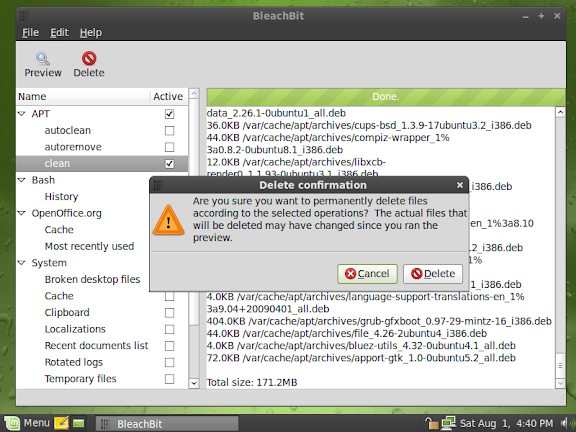
BleachBit 0.6.0 on Linux Mint 7
BleachBit on Linux Mint 7 showing a preview and the delete confirmation dialog
BleachBit 0.6.0 in Indonesian on Fedora 11 (Leonidas)
BleachBit in Indonesian on Fedora 11 (Leonidas)
BleachBit 0.6.0 in Romanian (limba română) on Ubuntu 9.04
BleachBit in Romanian on Ubuntu 9.04 showing the Firefox preview
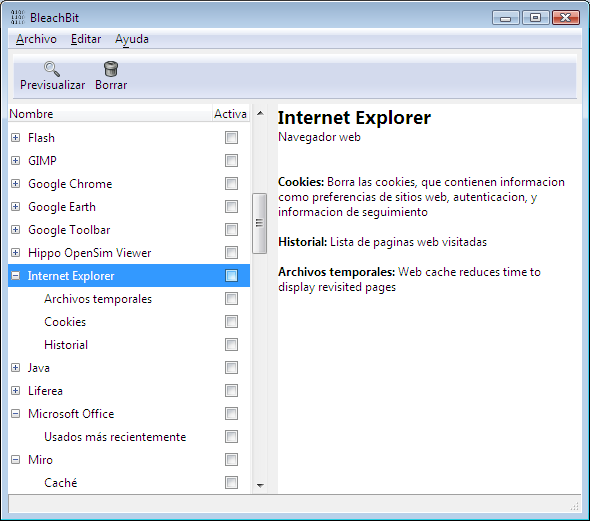
BleachBit 0.6.0 on Windows Vista in Spanish (Español) showing the Internet Explorer description
BleachBit on Windows Vista in Spanish showing the Internet Explorer description
BleachBit 0.6.0 on Windows Vista in Galician (Galego) showing the Firefox preview
BleachBit on Windows Vista in Galician showing the Firefox preview

See more screenshots on the new screenshots web page.

Download

Download BleachBit now. Installation packages are ready for 20 platforms including CentOS, Debian, Fedora, Mandriva, openSUSE, Red Hat, Ubuntu, and Windows.

Thursday, July 23, 2009

Test BleachBit 0.6.0 beta

Want to test BleachBit 0.6.0 beta? It contains numerous new features and some fixes. In particular, please test:

  • BleachBit should refuse to clean these applications while they are running: APT, Epiphany, Evolution, Firefox, Google Chrome, and Skype.
  • When previewing or deleting, the list of files should continuously scroll to the end.
  • On Linux, please test the new APT cleaner (only for Debian, Ubuntu, Linux Mint, and other apt-based systems).
  • On Linux, please test SQLite database vacuuming in Liferea.
  • On Windows, BleachBit (the application, not the installer) should automatically detect your native language and show text in the correct language (must be one of the 27 translated languages). To change the language, go to the Windows Control Panel, click on Regionalization, choose your language under Standards and Formats, and restart BleachBit.
  • On Windows XP, BleachBit should clean all of Internet Explorer without errors (which would be indicated in a red color).
  • On Windows Vista, you may see 'access denied' cleaning Internet Explorer unless you right click on the BleachBit shortcut and choose 'Run as Administrator.'
  • On Windows, BleachBit should empty the Recycle Bin of all fixed drives (i.e., not network drives, not remove-able drives, and not read-only drives).
  • There are new languages: Galician, Swedish, Romanian.

Please be aware: the positions of the Preview and Delete buttons have been swapped!

Because of the significant time it takes to prepare all the installation packages, only the following files are offered for this beta:

  • Microsoft Windows: BleachBit-0.6.0beta-Win32-install-full-gtk.exe
  • Ubuntu Hardy Heron 8.04 (Python 2.5): bleachbit_0.6.0beta-1_all_ubuntu804.deb
  • Ubuntu Jaunty Jackalope 9.04 (Python 2.6): bleachbit_0.6.0beta-1_all_ubuntu904.deb
  • Source code: bleachbit-0.6.0beta.tar.gz

[Note from 2026: the 0.6.6beta downloads were deleted a few years ago]

For other Linux distributions, you can try the most similar installation package above. For example, Ubuntu 8.10 and LinuxMint 6 and 7 users can download the Ubuntu 8.04 package. Alternatively, run from source, which is not very difficult.

Check back soon for the final release with the detailed release notes (as usual).

Tuesday, July 21, 2009

Free much more disk space than localepurge

Say you are a polyglot fluent in nine languages, and Ubuntu installs files for 500 languages: that means you are wasting disk space for 491 languages you will never use! Ridiculous!

Perhaps your root partition is nearly full, and you are tired of wasting time and space to backup these useless files. Who isn't?

You try localepurge to delete the unnecessary locale files, but the dirty secret is that localepurge misses most of the localizations. What?

Even worse if you use Fedora, CentOS, Mandriva, openSUSE, Red Hat, or any other non-APT distribution, you will find localepurge doesn't work at all. Rejected!

So quit fumbling around with localepurge, and stop the insanity: there is a better way!

Well how much more disk space does BleachBit recover than localepurge? 50% more? Wamby pamby! 100% more? I'm offended! 500% more? Guess even higher!

Scienticians in a laboratory tests prove BleachBit has 705.3% more cleaning power than localepurge on a standard Ubuntu Jaunty Jackalope install. Just look at the pretty chart!

Chart: BleachBit vs localepurge on Ubuntu 9.04

Yet BleachBit is so easy to use: on most any Linux distribution, first download and install BleachBit. Then start BleachBit's simple graphical interface as root by clicking Applications - System Tools - BleachBit as Administrator. Go to the preferences and check languages you want to keep. Close the preferences, and check the checkbox for Localizations. Then, click delete, and kiss those unwanted language files goodbye!

Want to delete more than the 181MB shown in the chart? No problem! As you install new software packages and run BleachBit again, its un-patented sensors with advanced open-source technology acquire the target, lock on, and delete even more files. The more you install, the more you save: BleachBit is a waste-hunting predator!

How much would you pay? $49.99? $19.99? You won't find this product in department stores, so put your credit card away, download for free today, and we'll throw in cleaners for Firefox, Flash, Opera, APT, Yum, and fifty other popular applications!

How about a file shredder to too? OK! BleachBit is the one tool that does it all!

What are you waiting for? Hurry while supplies last: download now!

Friday, July 17, 2009

Update to translators

Thank you to all translators for keeping the translations complete and updated. BleachBit is now in 25 languages! Several things have happened and are happening to make translators easier and better:

  • The new translation page gives detailed information for translating BleachBit.
  • As of today, Launchpad shows hints on certain strings. Here is an example:
    Launchpad showing translation tip for the word 'vacuum'
  • I continue to make an active effort to avoid introducing new strings and to avoid editing old strings. This reduces your work. However, some changes are unavoidable, so thanks for your patience.
  • I've reduced the number of strings by combining similar strings to reduce translators' work.
  • I've recruited help for specific new languages (Korean, Japanese, Chinese, Hindi, Romanian, Swedish) and for a few out-of-date languages on SourceForge's job postings, and many of these postings have led to new translations.
  • While BleachBit uses translations seamlessly on Linux, I'm still working on figuring out how they should work on Windows. A FAQ entry on the new documentation page describes a workaround for Windows users, so BleachBit displays words in your native language. (Let me know whether you need the workaround.)

Thursday, July 16, 2009

BleachBit 0.5.4 released

Version 0.5.4 is a maintenance release of BleachBit, the free and open source file and privacy cleaner for Linux and Windows. BleachBit aims to be an easy, advanced, and smart way to clean junk including cache, cookies, Internet history, localizations, logs, and temporary files.

This release is considered stable for Linux and a preview release for Windows. All users are encouraged to upgrade to this release. "Preview" means there are rough edges (such as the index.dat error noted below), but BleachBit should not "eat your files."

UPDATE

August 2, 2009: BleachBit 0.6.0 has been released.

Changes

The following changes are included since 0.5.3:

  • Add new feature to automatically hide irrelevant cleaners. "Irrelevant cleaners" are those that would make no changes on your system (such as for an application you don't have.) On by default, it slightly increases the time to start BleachBit, but it significantly reduces the time to find options because of the reduced clutter. BleachBit now has over 50 cleaners (many with multiple options), so the list of cleaners was too long.
  • Clean SeaMonkey
  • Delete Adobe Reader MRU's
  • Delete Opera download history, URL history, and current session.
  • Fix bug: don't uninstall OpenOffice.org extensions.
  • Specific to Linux
    • Clean X Window Systems session errors log thanks to Roman Horník.
  • Specific to Windows
    • Clean Google Toolbar.
    • Clean Microsoft Office MRU's.
    • Clean WinRAR MRU's.
    • Enhance Microsoft Windows MRU cleaner to clean mapped network drives MRU's and Vista/7-specific MRU's.
    • When upgrading, the uninstaller will guide you in uninstalling the old version before installing the new version.
    • Optionally create a desktop shortcut to start BleachBit.
    • Fix bug: in case with a cleaner option having multiple Windows registry entries to be deleted, some were skipped.

Translations

Thank you to the translators for making this the best translated release yet!

  • Add Hindi thanks to Asutosh Dash.
  • Add Norwegian Bokmål thanks to Daniel Delâtre.
  • Add Simplified Chinese thanks to 勇辉 (Jacky Chen) and mao_king.
  • Update Bulgarian thanks to Svetoslav Stefanov.
  • Update Czech thanks to Roman Horník.
  • Update Dutch thanks to Rob.
  • Update Finnish thanks to Lauri Lappalainen.
  • Update German thanks to MixCool.
  • Update Hebrew thanks to Yaron.
  • Update Hungarian thanks to Moltenice80.
  • Update Italian thanks to Luca Falavigna.
  • Update Russian thanks to Ilia Lilov aka lilovip and to Sergei Sedov.
  • Update Slovak thanks to Roman Horník.
  • Update Spanish thanks to juancarlospaco.
  • Update Turkish thanks to Ckurdu.
CodeNamePercentage translated
ar العربية 54.01%
bg български език 91.24%
ca Català 93.43%
cs česky 100%
da dansk 75.18%
de Deutsch 91.24%
es Español 100%
fi suomen kieli 38.69%
fr Français 89.05%
he עברית 100%
hi हिन्दी 87.59%
hu Magyar 90.51%
it Italiano 100%
nb Norsk (bokmål) 76.64%
nl Nederlands 100%
pl polski 92.70%
pt Português 75.18%
pt_BR Português do Brasil 89.78%
ru Pусский 100%
sk slovenčina 100%
sr српски 47.45%
tr Türkçe 100%
zh_CN 简体中文 44.53%

Known issues

  • Internet Explorer index.dat files cannot be cleaned because they are in use (locked) by a running process. You will see a red error.
  • On Windows when there is an exception (such as when a file can't be deleted), py2exe throws up an error dialog about a log file when exiting BleachBit.
  • Do translations work on Windows? BleachBit 0.5.4 is in 23 languages. Please reply with a comment on the blog or a bug report.

Screenshots

Simplified Chinese on Windows 7:

BleachBit 0.5.4 in Simplified Chinese (简化字) on Windows 7

Norwegian Bokmål on Ubuntu Jaunty Jackalope:

BleachBit 0.5.4 in Norwegian Bokmal (Norsk Bokmål) on Ubuntu Jaunty Jackalope (9.04)

Hindi on Fedora 10:

BleachBit 0.5.4 in Hindi (हिन्दी, हिंदी) on Fedora 10 (Cambridge)

See more screenshots on the new screenshots web page.

Download

Download BleachBit now. Installation packages are ready for 19 platforms including CentOS, Debian, Fedora, Mandriva, openSUSE, Red Hat, Ubuntu, and Windows.

Wednesday, July 1, 2009

BleachBit 0.5.3 released

Version 0.5.3 is a maintenance release of BleachBit, the free and open source file and privacy cleaner for Linux and Windows. BleachBit aims to be an easy, advanced, and smart way to clean junk including cache, cookies, Internet history, localizations, logs, and temporary files. BleachBit is better than freeware: it's open source.

This release is considered stable for Linux and a preview release for Windows. All users are encouraged to upgrade to this release.

UPDATE

July 16, 2009: BleachBit 0.5.4 has been released.

Changes

The following changes are included since 0.5.2:

  • Expand CleanerML to display warnings for options.
  • Add ability to clean Windows registry keys and named values (available in CleanerML).
  • Show in real time the total bytes cleaned in the status bar, so you don't have to scroll to the end of the list.
  • Clean FileZilla
  • Clean aMule thanks to juancarlospaco (LP#390496)
  • Specific to Linux
    • Clean Audacious thanks to juancarlospaco.
    • Clean Links2 thanks to MixCool.
    • Clean Xine thanks to juancarlospaco.
    • Clean a little more of espeak on Ubuntu.
  • Specific to Windows
    • Clean TeamViewer thanks to MixCool.
    • Clean Internet Explorer Typed URL history.
    • Clean Windows system MRU (most recently-used) lists.

Translations

  • Add comments in source code to aid translators.
  • Add Polish translation thanks to Dariusz Jakoniuk
  • Update Brazilian Portuguese thanks to Alex B. Oliveira
  • Update Catalan thanks to Oriol Gonzalez.
  • Update Czech thanks to Roman Nornik
  • Update Dutch thanks to Rob
  • Update French thanks to Edouard Marquez
  • Update German thanks to MixCool.
  • Update Hungarian thanks to charlie and Moltenice80.
  • Update Hebrew thanks to Yaron.
  • Update Italian thanks to Luca Falavigna
  • Update Russian thanks to Vadim Peretokin.
  • Update Slovak thanks to Roman Nornik
  • Update Spanish thanks to Alexsp2 and juancarlospaco

Want to help translate BleachBit?

Known issues

  • On Windows when upgrading it's recommended you uninstall before installing the new BleachBit. In the future the installer will be improved.
  • Internet Explorer index.dat files cannot be cleaned because they are in use (locked) by a running process. You will see a red error.
  • On Windows when there is an exception (such as when a file can't be deleted), py2exe throws up an error dialog about a log file when exiting BleachBit.
  • Do translations work on Windows? BleachBit 0.5.3 is in 20 languages. Please reply with a comment on the blog or a bug report.

Video

This video demonstrates BleachBit features while providing basic instructions. Shown on Ubuntu:

Shown on Windows XP:

Download

Download BleachBit now. Installation packages are ready for 19 platforms including CentOS, Debian, Fedora, Mandriva, openSUSE, Red Hat, Ubuntu, and Windows.

Tuesday, June 30, 2009

Download statistics by operating system

Have you wondered which operating system is the most popular? Well, I mean among BleachBit users.

More than idle fancy, the information helps guide important development decisions such as packaging and as platform-specific cleaners. There are specific cleaners for Windows, Ubuntu, Fedora, and maybe others. Slackware required a special tweak to prevent deleting important files. Debian and Ubuntu require .deb packaging which is completely different than the .rpm packaging for CentOS, Fedora, Mandriva, and OpenSUSE, and Red Hat. Of course, Windows users need .exe files with PyGTK included. All these special needs require extra time, which is time taken away from other platforms.

When I started BleachBit seven months ago, I first packaged it for Fedora, which I myself use. Then, I used openSUSE Build Service to build packages for Debian, Mandriva, openSUSE, and Ubuntu. I was surprised by the disparity and quickly realized most downloads were for Ubuntu, many for Debian, and only a few for Mandriva.

The major change is BleachBit now runs on Windows. When Download Squad reviewed BleachBit, the Windows numbers gave Ubuntu some competition. For the last week since 0.5.2 was released, the chart below shows Ubuntu is back in the lead. (Note: SourceForge doesn't update its stats often. These were the same numbers as yesterday, so who knows how old they really are.)

BleachBit 0.5.2 download statistics for about one week

Mark Twain one wrote, "There are three kinds of lies: lies, damned lies, and statistics." Indeed, this chart doesn't tell the whole story. BleachBit is included in the Debian and Ubuntu repositories, so there are more Debian and Ubuntu downloads than shown. However, Ubuntu Janty Jackalope users still download BleachBit from BleachBit because the version 0.3.x in the repository is old. SlackBuilds for Slackware has an old version 0.4.1, but I don't provide a package for Slackware. I don't know which version openSUSE's repository has, but a few weeks ago I was pleasantly surprised to find it in openSUSE. Last time I checked, Fedora's repository had too many rules for me to try to submit a package, and no one has volunteered. Last of all, Windows of course doesn't have a central repository (try to keep up, Microsoft).

Another factor is BleachBit for Windows is new, relatively unknown, and advertised as a "preview." Depending who you ask, there are 10-100 Windows desktop users for each Linux desktop user. As BleachBit matures on Windows, Ubuntu will likely take second place.

Now I'm confused which platform is still the most popular, but I still think Ubuntu wins— for now.

Monday, June 22, 2009

BleachBit 0.5.2 released

Version 0.5.2 is a maintenance release of BleachBit, the free and open source file and privacy cleaner for Linux and Windows. BleachBit aims to be an easy, advanced, and smart way to clean junk including cache, cookies, Internet history, localizations, logs, and temporary files. BleachBit is better than freeware: it's open source.

This release is considered stable for Linux and a preview release for Windows. All users are encouraged to upgrade to this release.

UPDATE

July 1, 2009: BleachBit 0.5.3 has been released.

Changes

The following changes are included since 0.5.1:

  • Clean Pidgin (chat client).
  • Clean Miro (Internet multimedia player) thanks to juancarlospaco.
  • Enhance Vuze/Azureus to clean backup files.
  • Clean OpenOffice.org 3.1 recent documents history.
  • Fix bug preventing URL history of Firefox 1 and 2 to be cleaned.
  • Fix error when cleaned size is negative.
  • Specific to Linux
    • Clean gedit thanks to Roman Horník.
    • Clean Nexuiz thanks to juancarlospaco.
    • Clean Firefox 3.5 beta on Ubuntu 9.04.
    • Clean more espeak localizations on Ubuntu and avoid error message.
    • Delete files in ~/.local/share/Trash/expunged (which can be left there by a Nautilus bug regarding files owned by other users).
    • Enhance aMSN (chat client) to clean cache.
    • Fix shredding of write-protected (read-only) files.
    • Fix compatibility packaging BleachBit on Python 2.6 systems (such as Fedora 11).
    • Don't ship Windows-only cleaners in Linux installation packages.
    • Publish RPM installation package for Fedora 11.
  • Specific to Microsoft Windows
    • Clean Winamp.
    • Clean Yahoo! Messenger.
    • Clean Windows temporary file folder.
    • Workaround Python bug where in some cases BleachBit could not find files to clean because ~ did not translate to %USERPROFILE%.
    • Update NSIS installer to 2.45 for better installation on Windows 7.
    • Show BleachBit uninstaller in Add/Remove Programs.
    • Use NRV2E instead of LZMA executable compression, so BleachBit will start faster.
    • Fix shredding of Firefox URL history.
    • Fix bug requiring user to confirm system-wide cleaners.
    • Don't ship Linux-only cleaners in the Windows installation package.
  • Add Dutch translation thanks to rob.
    BleachBit 0.5.2 on Ubuntu 9.04 (Jaunty Jackalope)
) in Dutch (Nederlands)
    Want to help translate BleachBit?
  • Add Hungarian translation thanks to alfa00red.
  • Update Arabic thanks to MaXeR.
  • Update Brazilian Portuguese thanks to A. Gabriel.
  • Update Czech thanks to Roman Horník.
  • Update German thanks to MixCool.
  • Update Italian thanks to Luca Falavigna.
  • Update Slovak thanks to milboy.
  • Simplify some strings to make it easier for translators. (This is a work in progress.)

Known issues

  • On Windows when upgrading it's recommended you uninstall before installing the new BleachBit. In the future the installer will be improved.
  • Internet Explorer index.dat files cannot be cleaned because they are in use (locked) by a running process. You will see a red error. (Other cleaner programs queue the Internet Explorer index.dat files for deletion during the user login process before Internet Explorer even starts.)
  • On Windows when there is an exception (such as when a file can't be deleted), py2exe throws up an error dialog about a log file when exiting BleachBit.
  • Do translations work on Windows? BleachBit 0.5.2 is in 19 languages. Please reply with a comment on the blog or a bug report.

Web changes

BleachBit is now hosted on Google App Engine at http://bleachbit-project.appspot.com [update from 2026: this site is no longer valid], and there are new discussion forums—a great place to ask questions.

Download

Download BleachBit now. Installation packages are ready for 19 platforms including CentOS, Debian, Fedora, Mandriva, openSUSE, Red Hat, Ubuntu, and Windows.
Saturday, June 20, 2009

"Features," the new web page

BleachBit's home page has been simplistic with few details about the application. It's about time it had a page detailing its capabilities, and now it does. Check out the new BleachBit features page on the new web site hosted on Google App Engine. The page lists all the cleaners, all the cleaner options, and enumerates the advanced features you may have overlooked. The new page also gives a sneak peak in to the next version 0.5.2.

Seeing all the cleaners for both Linux and Windows on a single web page emphasizes the length of the list. In fact, I have a backlog of cleaners to review submitted by BleachBit users. Many are for applications I have never heard of. In BleachBit's menu the list of cleaners feels cluttered. Each person prefers a different applications, so a feature needed more each day is a way to automatically hide irrelevant cleaners.

Tuesday, June 9, 2009

BleachBit 0.5.1 released

Version 0.5.1 is a maintenance release of BleachBit, the free and open source file and privacy cleaner for Linux and Windows. BleachBit aims to be an easy, advanced, and smart way to clean junk including cache, cookies, Internet history, localizations, logs, and temporary files. BleachBit is better than freeware: it's open source.

This release is considered stable for Linux and a preview release for Windows. All users are encouraged to upgrade to this release.

UPDATE

June 22, 2009: BleachBit 0.5.2 has been released.

Changes

The following changes are included since 0.5.0:

  • Add menu option to securely delete any file. Just click File - Shred files and then choose any files you want to permanently delete. The file contents will be overwritten ("shredded") to prevent file recovery.
    New secure file shredder (BleachBit 0.5.1 on Windows XP)
  • Shred files on Windows. On Linux, support file shredding without the external program shred.
  • Add warning when selecting option to clear Firefox's Places database, which includes bookmarks. (Firefox's design is to include bookmarks and URL history in a single file.) Many people want "URL history" instead of "Places."
  • Clean more Google Chrome and Skype files.
  • Clean Google Chrome on Linux.
  • Clean gFTP thanks to juancarlospaco.
  • Clean Opera, RealPlayer, and X-Chat on Windows.
  • Clean Java on Windows 7 (and probably Vista too).
  • Use less hard coded paths on Windows for BleachBit configuration, cleaner definitions, and in the cleaners themselves. Now BleachBit should be easy to run on a portable drive (USB drive), though this feature has not yet been tested.
  • White-list certain files in /tmp/: TrueCrypt containers, the VirtualBox lock file, the WINE server lock file, two special KDE files, and a special PulseAudio file.
  • Request administrator privileges to install on Windows Vista.
  • Fix cleaning of Hippo OpenSim Viewer and Second Life on Windows.
  • On Windows, update the included GTK+ runtime from 2.12.9 (a year old) to 2.16.1.
  • Shrink the Windows installer by 20%.
  • On Windows Vista and 7 prevent listing some (maybe all) files twice in the preview.
  • Fix display bug related to XML parsing when there is no description element directly under the cleaner element.
  • Update Brazilian Portuguese thanks to Alex B. Oliveira and Yann S. Melo.
    Want to help translate?
  • Update Czech thanks to Roman Horník.
  • Update Serbian thanks to turncoat.
  • Update German thanks to Lunix.

Known issues

  • Internet Explorer index.dat files cannot be cleaned because they are in use (locked) by a running process. You will see a red error. (Other cleaner programs queue the Internet Explorer index.dat files for deletion during the user login process before Internet Explorer starts.)
  • On Windows when there is an exception (such as when a file can't be deleted), py2exe throws up an error dialog about a log file when exiting BleachBit.

Download

Download BleachBit now. Installation packages are ready for 18 platforms including CentOS, Debian, Fedora, Mandriva, openSUSE, Red Hat, Ubuntu, and Windows.

Monday, June 8, 2009

Statistical outlier in the MTBF (a sad story)

It was late yesterday—just hours from the anticipated BleachBit 0.5.1 release. All the QA was done. The new web pages were ready. I finished manually building installation packages for Windows, Debian 5, Ubuntu 6.06, and Ubuntu 9.04, The openSUSE Build Service finished building the remaining installation packages except for just one. When OBS finished building SLE 9, I was ready to "push the button" for the release. I was happy with the progress in 0.5.1—a good combination of features, enhancements, bug fixes, and translation updates— and looked forward to making the public announcement.

After all this work, it was time to take a break. On my main computer where I develop BleachBit I was starting to (legally) rip a new music CD in SoundJuicer. Suddenly, the screen went blank. Had I accidentally caused the system to hibernate? Maybe I had brushed the sleep key? I checked the caps lock key for a "pulse": no, it doesn't respond. Eventually the dark Linux kernel console emerged to coldly repeat two lines of cryptic errors about sda (sda is the hard drive). `'Tis some visitor,' I muttered, `tapping at my chamber door - Only this, and nothing more.' I powered the machine down forcefully while reassuring myself it was merely a fluke I/O driver malfunction: surely a reboot would restore my precious system. I haven't experienced any Linux driver stability issues in about five years, and then it was only when I made the careless mistake of ejecting a DVD while it was burning. Lately this computer had been very stable and actually had been running continuously without reboot for some 50-60 days. Disappointed to lose progress on my uptime record, I resigned to the need to reboot. Strangely the BIOS POST hard drive detection took longer than usual. Then, the BIOS flashed a message that caused my stomach to sink: INSERT BOOTABLE DISK, OPERATING SYSTEM NOT FOUND. I rebooted again: same results. I swapped cables and the SATA controller port—nothing.

So the six-month-old 500GB hard drive in a five-year-old Compaq desktop failed, and the BIOS will not acknowledge it exists. I'm still diagnosing whether it's actually the hard drive or the controller on the motherboard. I hope it's not the hard drive because some recent family photos were not backed up, but I hope it's not the motherboard because I don't have a budget for a new PC.

All that to say two things. First, BleachBit 0.5.1 is delayed (though all the source code safe thanks to SourceForge SVN). Second, never become complacent about performing regular backups! In my day job many times I've left the "operating room" to inform the worried "relatives" of the "patient's" terminal state without fully internalizing the potential for me to be the next person blind-sighted by a statistical outlier in the MTBF. Now that outlier is me.

Thursday, June 4, 2009

Validating secure erase

For a while, BleachBit has supported a secure erase feature by invoking the external program shred ubiquitous on Linux systems. (The secure erase feature overwrites the contents of files to prevent data recovery.) Of course, Windows doesn't come with shred, so BleachBit 0.5.1 now includes internal code to do the same. It's important to validate the new code, so we know it works as advertised.

First, the new code includes a unit test (as does much of BleachBit code). The unit test creates a file with a short, repeating pattern "abcdefghij," securely erases the file, and checks for remnants of the pattern. The unit test passes on Fedora 10 and on Windows 7.

The unit test has limitations, so I also performed a more sophisticated test. On Linux, I executed these commands to create and mount a fresh ext3 loopback filesystem:

dd if=/dev/zero of=/tmp/testfs bs=1M count=5 # 5 megabytes
/sbin/mkfs.ext3 /tmp/testfs
sudo mkdir /mnt/testfs
sudo mount -o loop /tmp/testfs /mnt/testfs/

Then, I executed this Python code to create a 3,000,000-byte file with the same repeating pattern and securely delete it with BleachBit.

import FileUtilities
import tempfile
import os

fn = "/mnt/testfs/wipeme"
f = open(fn, 'wb+')
f.write("abcdefghij" * (3 * 1000 * 100))
f.close()

FileUtilities.wipe_contents(fn)

Don't forget to unmount the file system:

sudo umount /mnt/testfs/

If the secure file eraser worked, there should now be zero copies of the repeating pattern. Indeed, there are none!

[a@z bleachbit]$ grep abc /tmp/testfs
[a@z bleachbit]$ grep efg /tmp/testfs
[a@z bleachbit]$ strings /tmp/testfs
lost+found
wipeme
lost+found
wipeme

Compared to Gutmann-35

BleachBit's secure erase method is a single pass with zeros, so why doesn't BleachBit use the Gutmann-35 method? The Guttman secure deletion method gives some people a false sense of security. A long time ago (in the technology timeline) the 35-pass Gutmann method was designed for MFM/RLL hard disk drives. My last computer to include a MFM hard drive was purchased in 1989. Time has passed and technology has changed. Today's PATA/IDE and SATA hard drives are much more dense, and NIST, the NSA, and other experts now agree that a single pass to overwrite data is sufficient.

However, there are two exceptions. First, erasure of individual files (by any erasure method) is not effective in some situations such as using ext3 with the non-default option data=journal. Also, modern hard drives sometimes move data transparently to the operating system. In such cases, it is necessary to either securely wipe the entire disk (in the case of the former) or physically destroy it (in case of the latter).

That said, BleachBit's method is much quicker than Guttman-35 and generally equally effective for everyday use. Generally files deleted securely by BleachBit cannot be recovered by any undelete or other file recovery methods. If you are worried about highly-motivated and well-resourced people watching you, don't forget to take your prescription. Besides, "they" have more convenient ways of watching you.

Sunday, May 31, 2009

Building the BleachBit installer for Windows

Building BleachBit 0.5.0 for Windows is relatively easy. The biggest challenge is installing the many dependencies. The end result is a single-file, redistributable installer which contains all dependencies: GTK+, PyGTK, etc. Some other projects with the same dependencies install the dependencies with a sub-installer, but BleachBit's approach is seamless.

Dependencies

Install these dependencies:

  • Python 2.5.4. Do not use Python 2.6.2 because it causes the error
    "This application has failed to start because the application configuration is incorrect. Reinstalling the application may fix this problem"
    related to a MSVCR90.DLL issue.)
  • NSIS 2.44
  • py2exe 0.6.9
  • PyCairo 1.4
  • PyGObject 2.14
  • PyGTK 2.12
  • GTK+ 2.12 [broken was removed]

This GTK+ runtime is old. Newer versions may work but haven't been tested yet.

Build process

After installing the dependencies, build and package BleachBit like this:

  1. Extract BleachBit source tarball or retrieve the source by SVN.
  2. Change to the directory with setup.py.
  3. Optionally, unzip upx.exe from UPX 3.03 to this directory. UPX compresses the executables and DLLs. While UPX may increase the size of the installer slightly (because of the double compression), it saves disk space by reducing the final installation footprint.
  4. If you repeat the installer build process often, run this command to save time:
    upx --best c:\gtk\bin\*.*
    
  5. Compile the gettext localization files from .po to .mo format with this command:
    make -C po local 
    
    Microsoft Windows doesn't have make, so you may need a Cygwin environment; I use a Linux machine with file sharing setup between Windows and Linux.
  6. If you are using BleachBit version 0.5.0 exactly, replace setup_py2exe.bat with revision 426. (This revision will be included in BleachBit 0.5.1.)
  7. Run setup_py2exe.bat to clean any old builds, invoke setup.py and py2exe, copy remaining files from the GTK+ runtime (py2exe misses some necessary GTK+ files), compress executables with UPX, purge several megabytes of unnecessary GTK+ locales, and invoke NSIS to build the installer.

You're done. Now test the installer on a fresh machine (without any of these dependencies installed.)

Other uses

Installing these dependencies has other uses than building a redistributable package. The environment is useful for developing BleachBit. Also, you can run new versions of BleachBit without having to re-download and re-install the large GTK+ runtime for each BleachBit release: this saves about 98% of the download size—not that it matters so much these days with high-speed Internet.

Friday, May 29, 2009

BleachBit 0.5.0 released

Version 0.5.0 is a major release of BleachBit, the free and open source file and privacy cleaner for Linux and Windows. BleachBit aims to be an easy, advanced, and smart way to clean junk including cache, cookies, Internet history, localizations, logs, and temporary files.

This is an unstable release intended only for testing.

Changes

The following changes are included since 0.4.2:

  • Add support for Microsoft Windows XP, Vista, and 7.
  • Add convenient Windows installer (with all the dependencies included) and uninstaller .
  • Add cleaners for Google Chrome, Microsoft Internet Explorer, and Safari.
  • Clean more cookies created by Macromedia/Adobe Flash.
  • Enhance CleanerML to hide cleaners on unsupported operating systems (such as hiding WINE and Rhythmbox on Windows).
  • Fixed bug "Bookmarks in Firefox can't be saved.".
  • Change the cleaning and preview system from a thread to an idle function to support Windows. One nice side effect is closing BleachBit (with the X in the corner) during a cleaning operation immediately closes BleachBit and stops further cleaning. Another side effect is this change facilitates command line invocation of BleachBit (to be added later).
  • Add Brazilian Portuguese translation thanks to A. Gabriel.
  • Add Czech and Slovak translations thanks to Roman Horník.
  • Add Serbian translation thanks to turncoat.
  • Update Arabic translation thanks to MaXer.
  • Update Danish translation thanks to Jimmy Frydkær Jensen.
  • Update French translation thanks to Mathieu Pasquet.
BleachBit 0.5.0, the free and open source file and privacy cleaner, cleaning Firefox 3 cache on Windows 7

Known issues

  • Installation may fail on Vista and Windows 7 with the error 'Error opening file for writing.' Make sure you right click on the installer .exe and choose 'Run as Administrator.'
  • Internet Explorer index.dat files cannot be cleaned because they are in use (locked) by a running process. You will see a red error. (Other cleaner programs clean the MSIE index.dat files during the user login process before MSIE starts.)
  • When running a preview in Windows 7 (and probably Vista) some files are listed twice. (This is harmless, but it inflates the preview size.)
  • A few cleaners don't clean anything on Windows because they aren't yet updated for Windows.
  • Localizations may not work on Windows, so BleachBit may appear in English even for languages with translations (over 10 languages). Would you please let me know?
  • The Windows installer is a bit too large (because the GTK+ runtime is large).
  • On Windows when there is an exception (such as when a file can't be deleted), py2exe throws up an error dialog about a log file when exiting BleachBit.
  • On Windows shredding doesn't work.
  • Windows virus scanners may not like that BleachBit uses UPX executable compression to reduce its disk space footprint. Please report any issues.
  • BleachBit may delete TrueCrypt containers on Linux.
  • Some unit tests may fail on Windows.
  • The taskbar button on Windows 7 has the wrong icon.
  • Installing BleachBit in the non-default location may cause it to lose some cleaners.

Download

Download BleachBit now. Installation packages are ready for 18 platforms including CentOS, Debian, Fedora, Mandriva, openSUSE, Red Hat, Ubuntu, and Windows.

Sunday, May 17, 2009

Bookmarks can't be saved in Firefox 3

Thank you to Rob from Holland who (not only donated to BleachBit but) reported this bug. When deleting the Places database in Firefox version 3 using BleachBit 0.4.2, it's not possible to save new bookmarks. The bookmarks disappear when Firefox is restarted.

A Mozilla knowledge base article gives the solution. If you suffer this bug in BleachBit 0.4.2, close Firefox and run this command:

rm ~/.mozilla/firefox/*/bookmarkbackups/*json

The explanation: Firefox tries to reconstruct the missing places.sqlite file from the JSON backups.

The fix is applied for BleachBit 0.5.0. For older versions, you may apply this patch [link broken].

Monday, May 11, 2009

BleachBit on Windows Vista

With a change to replace threading with use of PyGTK's idle event loop, BleachBit starts on Microsoft Windows.

BleachBit doesn't do anything useful yet on Windows because the file paths it currently knows are specific to Linux: that's easy to fix. The part I am not looking forward to is trying to bundle GTK+, Python, PyGTK, PyCairo, and PyGObject into a simple installer, and then I have convince users to download 24MB of runtime to run a 100KB program. Today's modern system have plenty of bandwidth and disk space, but still that's ironic situation for a system cleaner.

Previous post: BleachBit on Windows (February 2009).

Update: BleachBit 0.5.0 released with support for Microsoft Windows.

The new thread-free code also paves the way to implement a command-line interface (CLI) one day.

Sunday, May 10, 2009

BleachBit 0.4.2 released

Version 0.4.2 is a maintenance release of BleachBit, the file and privacy cleaner for Linux. BleachBit aims to be an easy, advanced, and smart way to clean junk including cache, cookies, Internet history, localizations, logs, and temporary files.

Changes

The following changes are included since 0.4.1:

  • Clean Adobe Reader 9.0's cache (in addition to previous versions of Reader).
  • Whitelist paths in /var/log/ to prevent deleting important files on Slackware.
  • Add Danish translation.
  • Update French, German, and Finnish translations.

All reported bugs are fixed. BleachBit packages for Slackware can now be downloaded from SlackBuilds.org.

Download

Download BleachBit now. Installation packages are ready for 18 Linux distributions-versions including CentOS, Debian, Fedora, Mandriva, openSUSE, Red Hat, and Ubuntu.